Consent Mode v2 Not Working? 7 CMP Wiring Mistakes and the GTM Fix Order
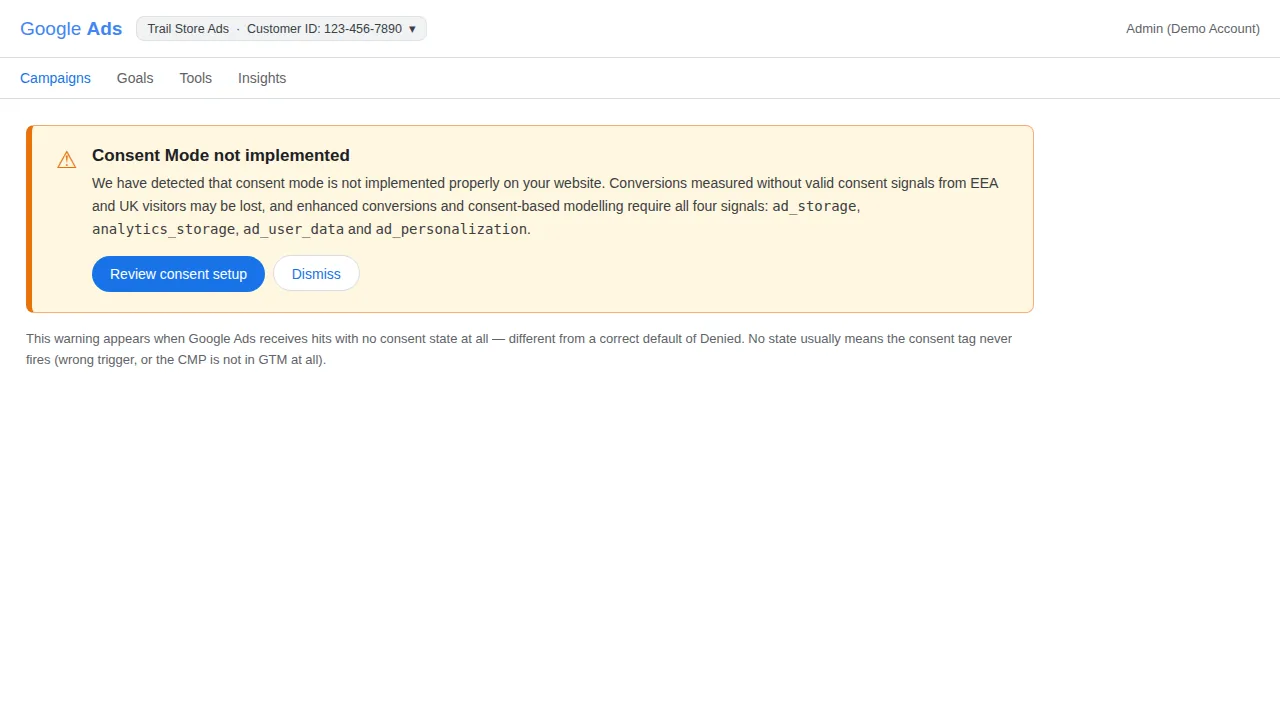
You set up a Consent Management Platform (CMP), the banner shows, and GA4 still says consent denied. Or Google Ads says your consent setup is wrong. Or your users consented but the tags still did not fire.
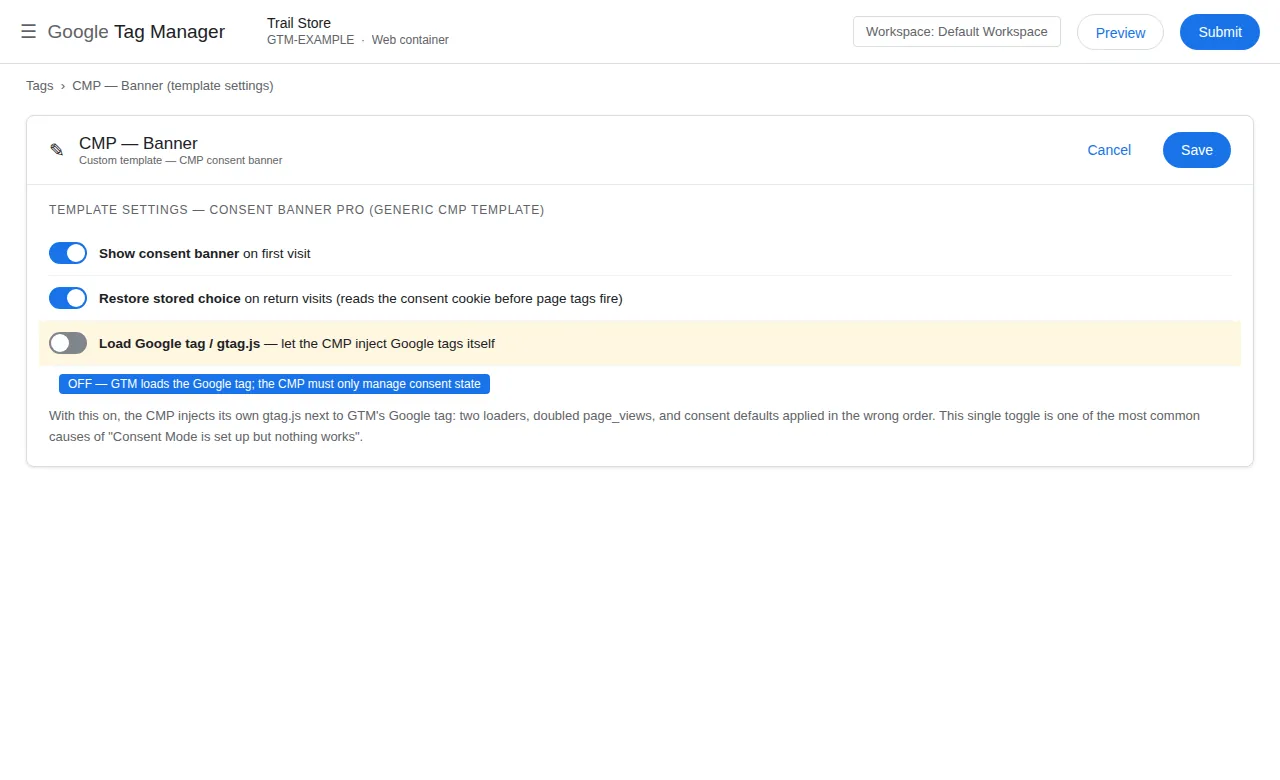
Consent Mode v2 is not a setting — it is a wiring exercise. A CMP talks to GTM, GTM talks to Google, and Google enforces the consent state. If any link in that chain is wrong, consent never arrives. This guide works through the seven wiring mistakes that break it, in the order you should check them.
Quick answer
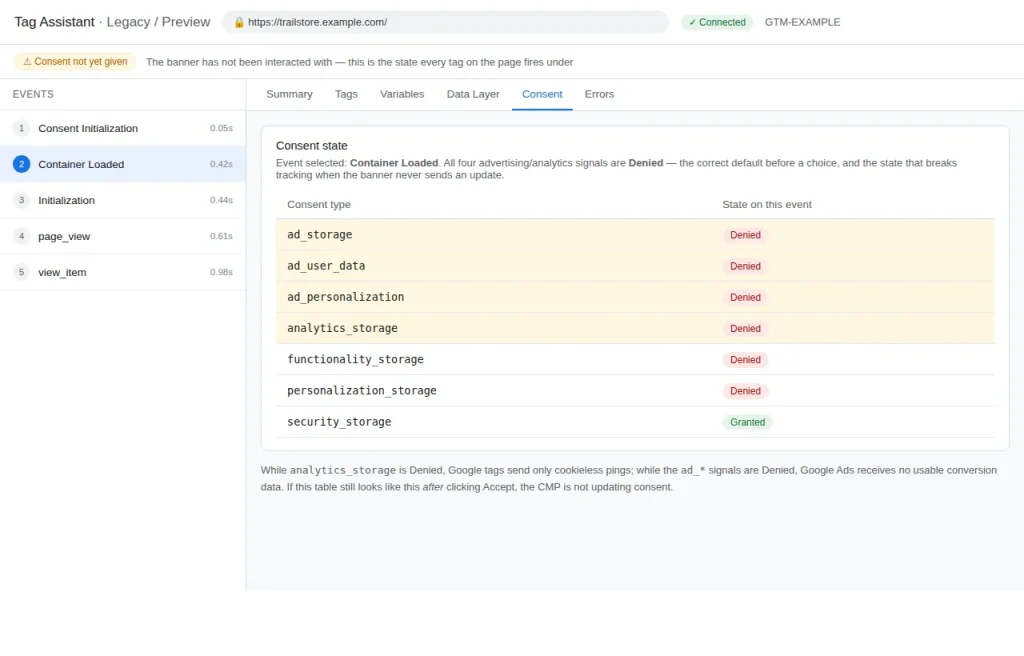
If your CMP banner shows but Google still says consent denied, the most likely cause is that consent defaults were never set, or the CMP’s consent signal is not reaching GTM. Check the Consent tab in GTM Preview first — it shows the consent state for every tag, and it tells you whether the problem is in the CMP, in GTM, or in Google.
How consent is supposed to move
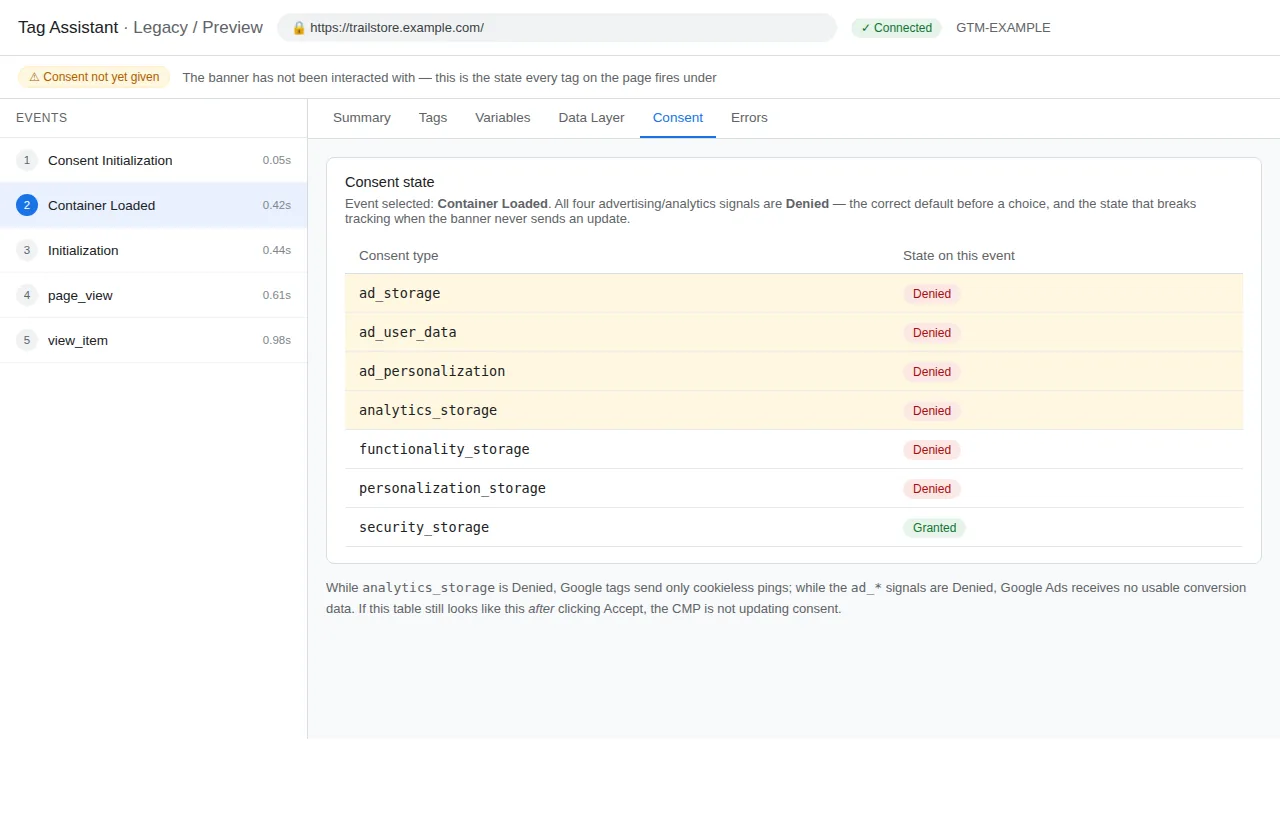
Consent moves in three steps, and each one has to work:
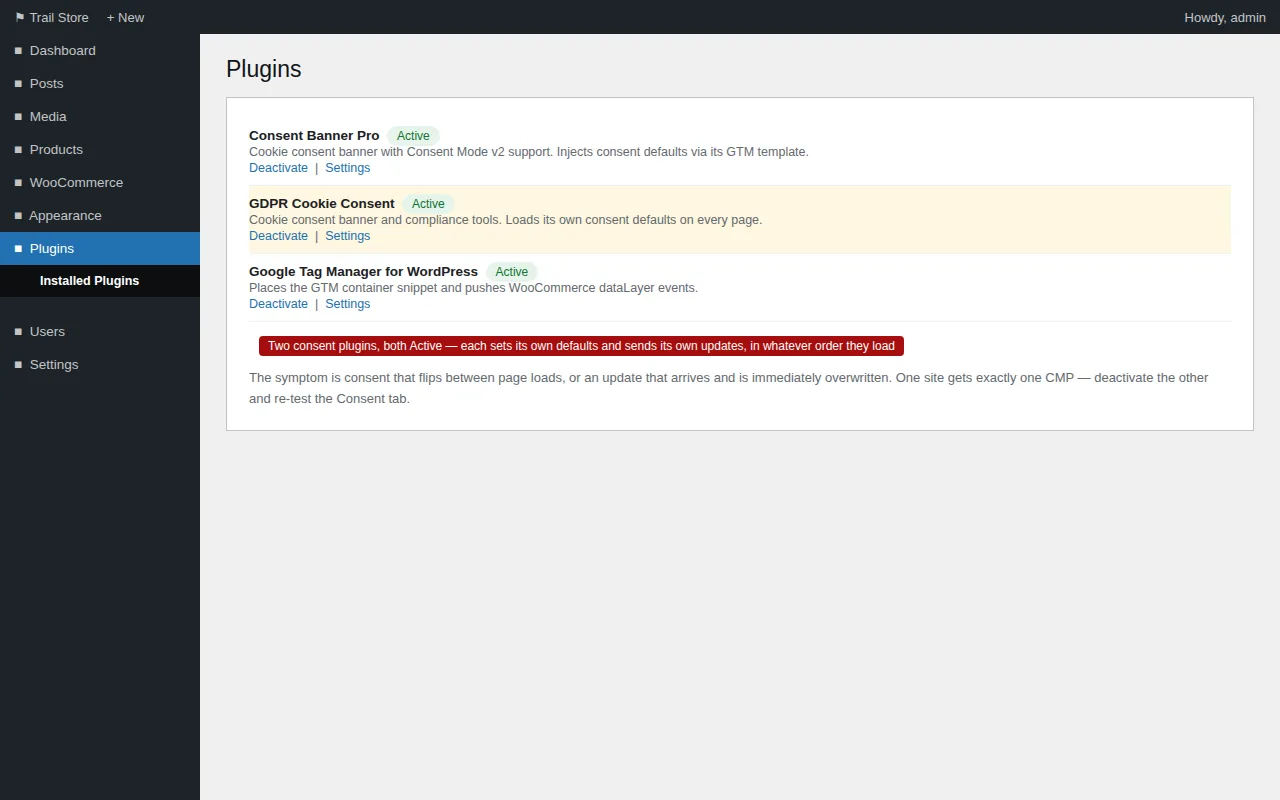
- The CMP asks the user. The banner shows, the user chooses, and the CMP records the choice.
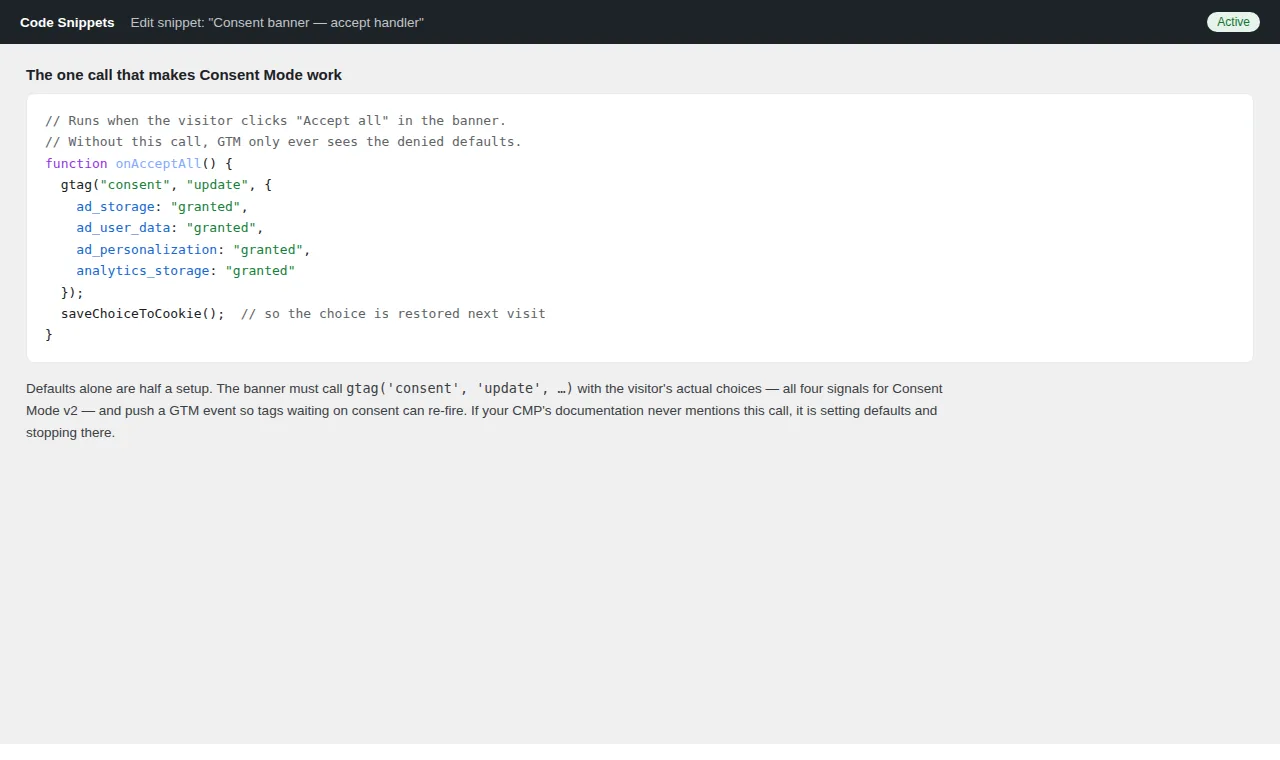
- The CMP tells GTM. The CMP’s consent signal reaches GTM — either through a consent variable, a data layer push, or a CMP integration.
- GTM tells Google. GTM’s tags check the consent state before they fire, and Google’s tags respect the consent signal.
If any step fails, consent never arrives. The Consent tab in GTM Preview shows the state at each step, and it is the first place to look.
What the Consent tab is telling you
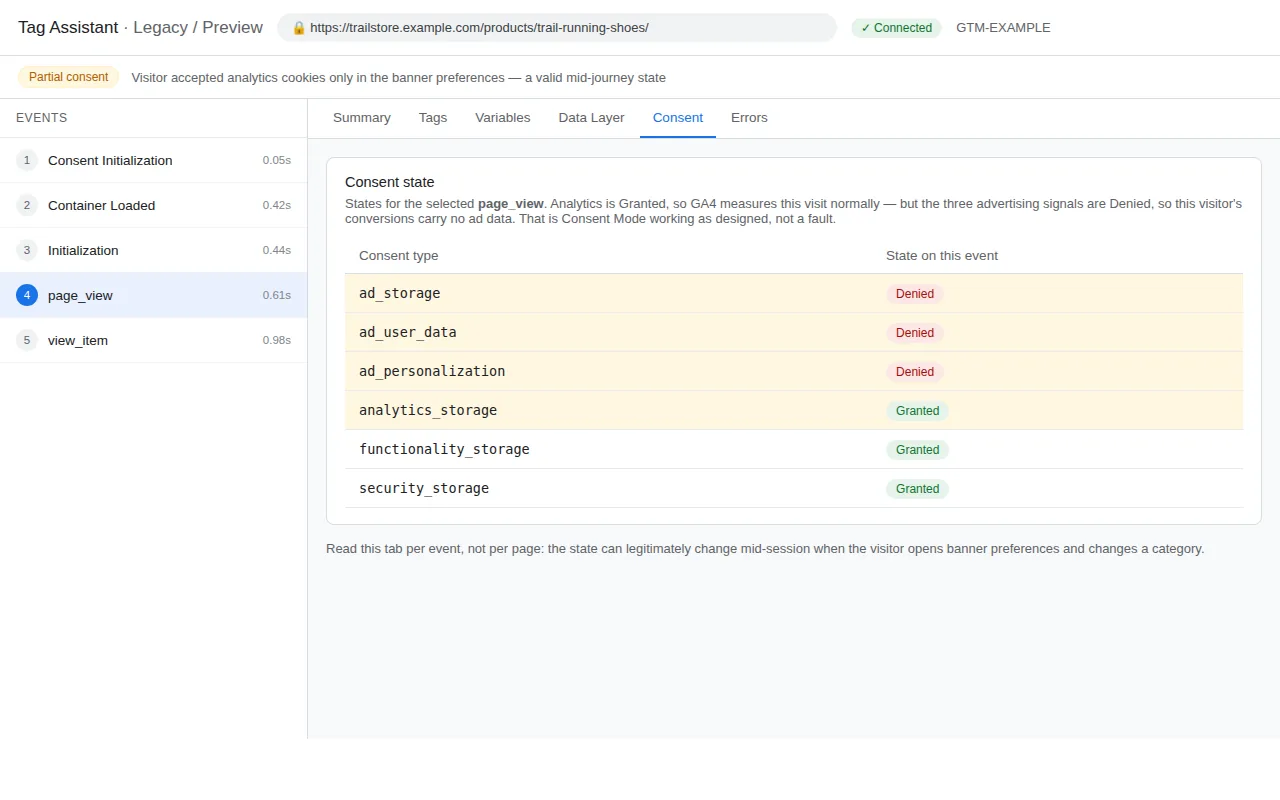
In GTM Preview, the Consent tab shows the consent state for the page. It is the fastest diagnostic in consent debugging:
| What you see | What it means | What to do |
|---|---|---|
| denied | The user has not consented, or consent was never set. | Check the CMP and the consent defaults. |
| granted | The user has consented, and the tags should fire. | If the tags still do not fire, the problem is in the tags, not consent. |
| No consent state | The consent signal never reached GTM. | Check the CMP integration and the data layer. |
That third state — no consent state at all — is the most common cause of Consent Mode v2 not working. It means the CMP’s signal is not reaching GTM, and the tags are waiting for a signal that never arrives.
The 7 mistakes
1. No consent defaults at all
Symptom: The Consent tab shows no consent state, and no tags fire.
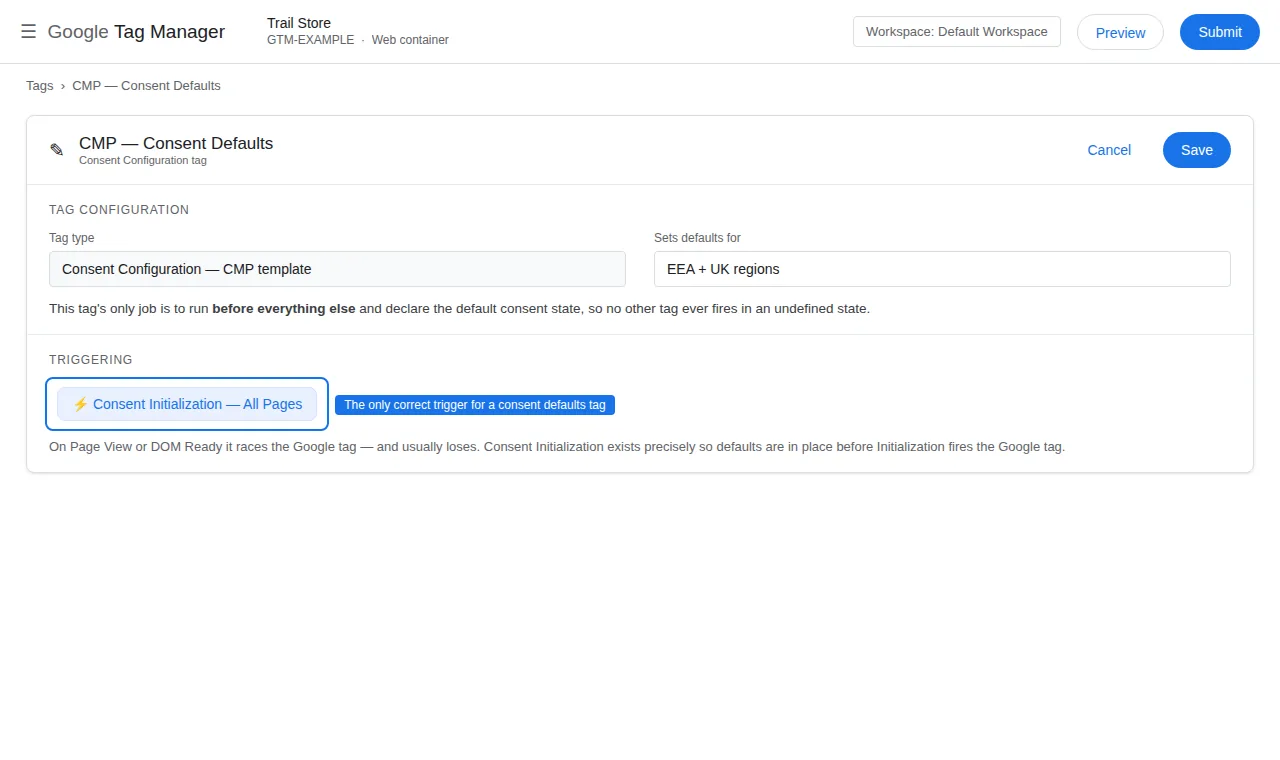
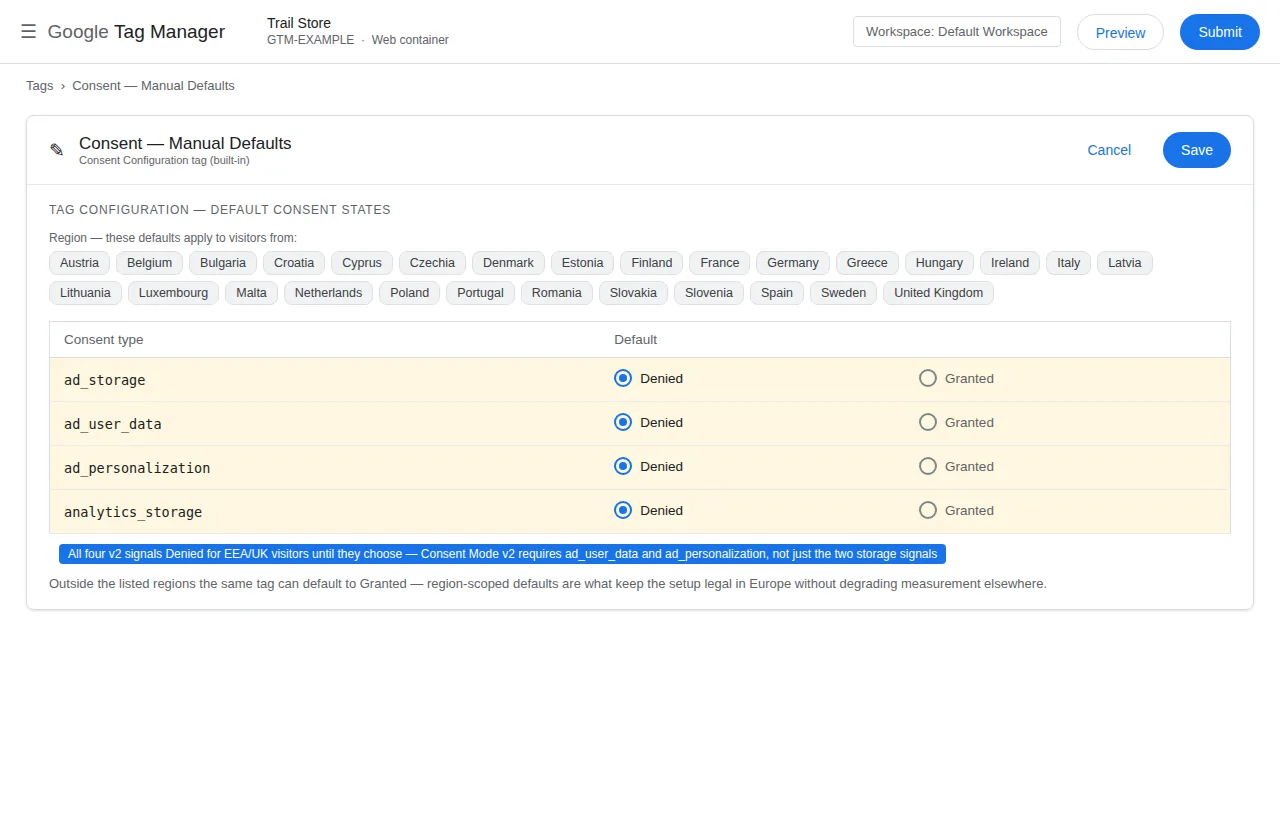
Fix: Set consent defaults in GTM. In the GTM container, go to Admin > Container Settings > Consent Settings, and set the default consent state for your region. Without defaults, GTM has no consent state to work with, and tags will not fire. The defaults should be denied for the EEA — that is the point of Consent Mode v2 — but they must exist. Then test in Preview: the Consent tab should show the defaults.
2. The CMP’s consent signal never reaches GTM
Symptom: The banner shows, the user consents, but the Consent tab still shows denied.
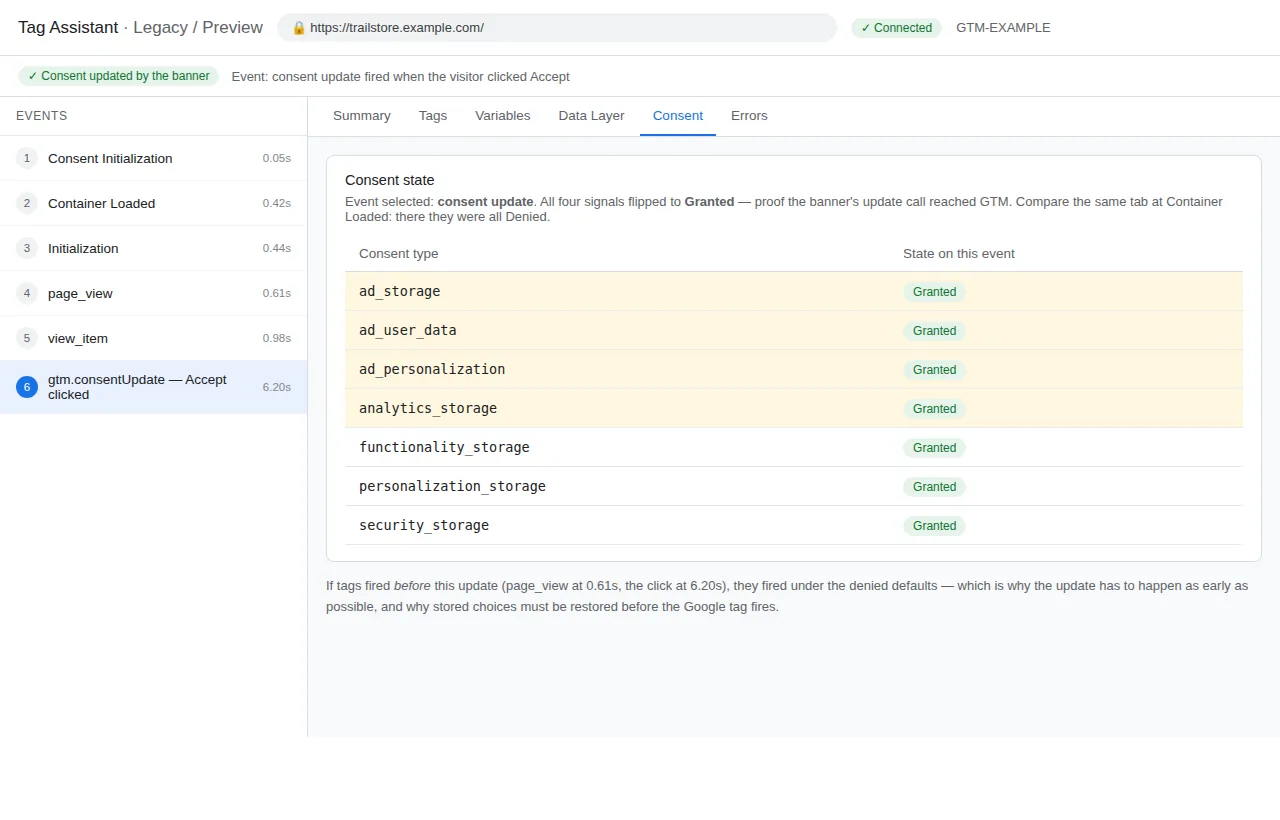
Fix: Check the CMP integration. The CMP has to tell GTM what the user chose — through a consent variable, a data layer push, or a CMP integration. If the CMP is not integrated with GTM, the signal never arrives. Check the CMP’s settings for a GTM integration, and check that the data layer push is happening. In Preview, watch the dataLayer for the consent update event — if it never appears, the CMP is not talking to GTM.
3. The consent update happens after the tags fire
Symptom: The tags fire, but with the wrong consent state — or they fire before the user has chosen.
Fix: The consent update has to happen before the tags fire. In GTM, check the tag sequencing: the consent update should fire on the earliest trigger, before any Google tags. If the tags fire on Page View and the consent update fires on DOM Ready, the tags will fire with the default state — denied — and never re-fire. Move the consent update earlier, or use a Consent Initialization trigger.
4. The CMP’s consent mode is wrong
Symptom: The Consent tab shows a consent state, but it is the wrong one — or the CMP’s states do not match GTM’s.
Fix: Fix it in the consent management platform (or your data layer): map every state to one of the two consent modes and remove or remap extras. Then re-run the Consent tab test. Consent Mode v2’s two states are analytics_storage and ad_storage — a third state or a differently spelled key is dead data.
5. The region is wrong
Symptom: Consent works in one country but not another — or it works for you but not for your users.
Fix: Consent defaults are region-specific. In GTM, check that the defaults are set for the right region — the EEA, the UK, or your specific country. If the defaults are set for the wrong region, or not set at all for the user’s region, the tags will not fire. Check the region settings in the CMP as well: the CMP’s banner has to show for the user’s region, or consent will never be collected.
6. The tags ignore consent
Symptom: The Consent tab shows granted, but the tags still do not fire — or they fire when they should not.
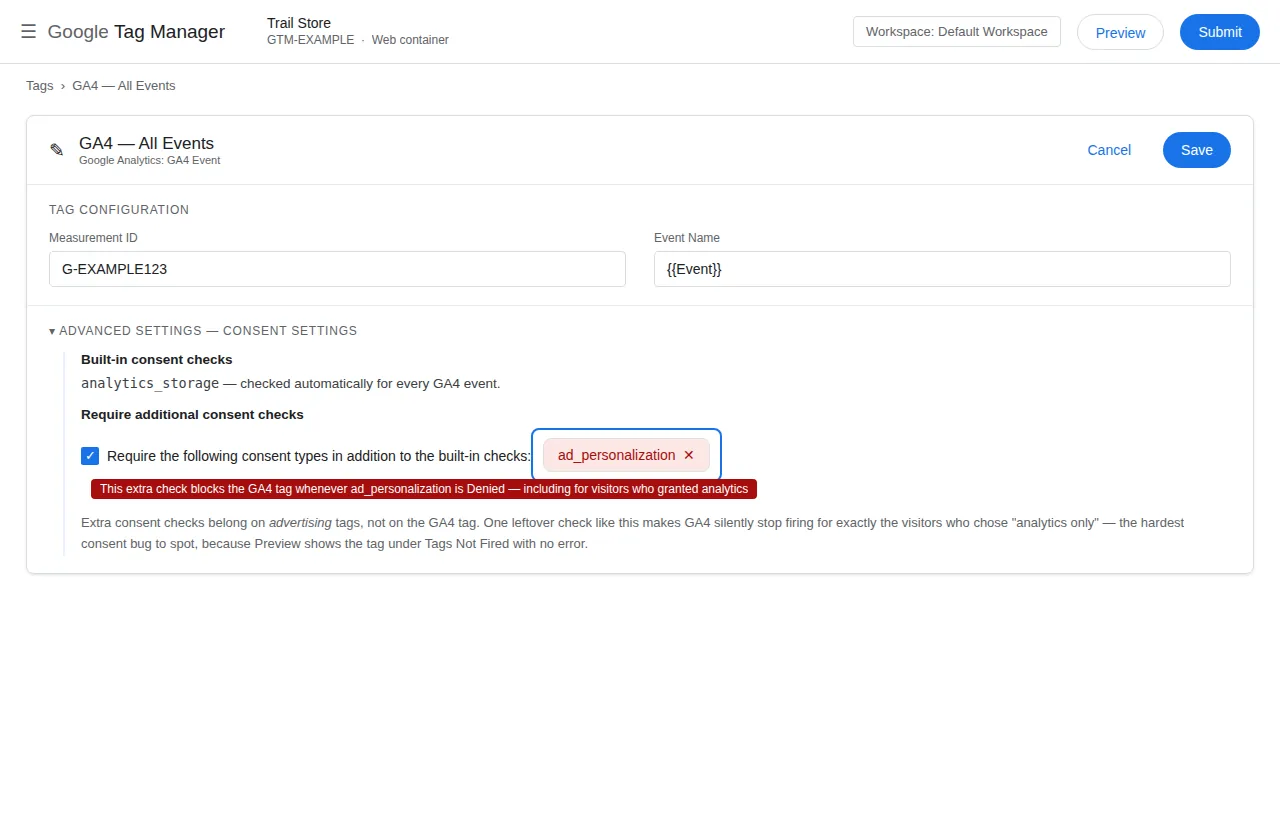
Fix: Check the tags’ consent settings. In GTM, each tag has a consent setting: it can require consent, or it can fire regardless. If a tag is set to require consent and the consent state is denied, it will not fire — that is correct. If a tag fires when it should not, its consent setting is wrong. Check the tag’s Advanced Settings > Consent Settings, and make sure the tag requires the right consent type.
7. The CMP is not actually a CMP
Symptom: The banner shows, but the Consent tab shows no consent state, and the CMP’s settings have no GTM integration.
Fix: Not every banner is a CMP. Some plugins show a banner and do nothing else — they do not send a consent signal to GTM, and they do not integrate with Consent Mode v2. If your “CMP” has no GTM integration, no data layer push, and no consent variable, it is not a CMP — it is a banner. Replace it with a real CMP (OneTrust, Cookiebot, or a similar platform) that integrates with GTM, or build the integration yourself with a data layer push.
The fix order
Work this list from the top. Stop as soon as the Consent tab shows the right state:
- Open the Consent tab in Preview and read the state.
- Set consent defaults in GTM if they are missing.
- Check that the CMP’s signal reaches GTM — watch the dataLayer for the consent update.
- Check that the consent update happens before the tags fire.
- Check that the CMP’s states map to
analytics_storageandad_storage. - Check the region settings in GTM and the CMP.
- Check the tags’ consent settings.
How to verify it works
After fixing, verify in three places:
| Where | What to check | What success looks like |
|---|---|---|
| GTM Preview, Consent tab | The consent state for the page. | granted after the user consents, denied before. |
| GA4 DebugView | The events after consent. | Events appear after consent, not before. |
| Google Ads, Consent Mode | The consent status for the account. | Consent Mode v2 shows as set up, not “not set up”. |
If all three show the right state, Consent Mode v2 is working. If any one does not, work the fix order again — the problem is in the link that check covers.
Still broken? Run the checker
If you would rather skip the manual checks, use the tool: run the free Consent Mode Checker on the homepage and let it test the live site. It checks the consent defaults, the CMP signal, and the tag consent settings in one pass. If the checker finds a problem, it tells you which link in the chain is broken — and the fix order above tells you how to fix it.
If the consent setup is part of a larger GTM build, the WordPress × GA4 hub and the WooCommerce × GA4 hub show the finished consent wiring for each platform.
Frequently asked questions
Why does my CMP banner show but GA4 still says consent denied?
Usually the consent signal is not reaching GTM, or consent defaults were never set. Check the Consent tab in Preview: if it shows no consent state, the CMP is not talking to GTM; if it shows denied, the defaults are wrong or the user has not consented.
Do I need a CMP to use Consent Mode v2?
Yes, for the EEA — Consent Mode v2 requires a CMP to collect consent. Without one, there is no consent signal to send to Google. A banner alone is not enough: the CMP has to integrate with GTM and send the consent state.
What is the difference between Consent Mode v2 and the old Consent Mode?
Consent Mode v2 adds two new parameters — ad_user_data and ad_personalization — and requires a CMP that Google has certified. The old Consent Mode only had analytics_storage and ad_storage. If your CMP is not certified for v2, Google will treat your consent setup as incomplete.
My tags fire, but Google Ads says consent is not set up. Why?
Google Ads checks the consent setup separately from GTM. If the CMP’s signal reaches GTM but not Google Ads — or if the consent settings in Google Ads are wrong — Ads will report the setup as incomplete. Check the consent settings in Google Ads, and make sure the tags that send to Ads have the right consent settings.
Can I test Consent Mode v2 without a real user?
Yes — use GTM Preview. Open the Consent tab, set the consent state manually, and watch the tags fire or not fire. Preview lets you test every consent state without a real user, and it shows the consent state for every tag.
Does Consent Mode v2 affect my GA4 data?
Yes — that is the point. When consent is denied, GA4 receives no data for that user; when it is granted, GA4 receives the full data. Consent Mode v2’s modelling fills some of the gap, but it is not a substitute for consent. If your GA4 data drops after setting up Consent Mode v2, that is expected — it means consent is working.