GA4 Purchase Missing, Items (Not Set) or $0 Revenue? 10 DataLayer Fixes
By Humayun Kabir Naim — 7 November 2026
Quick answer
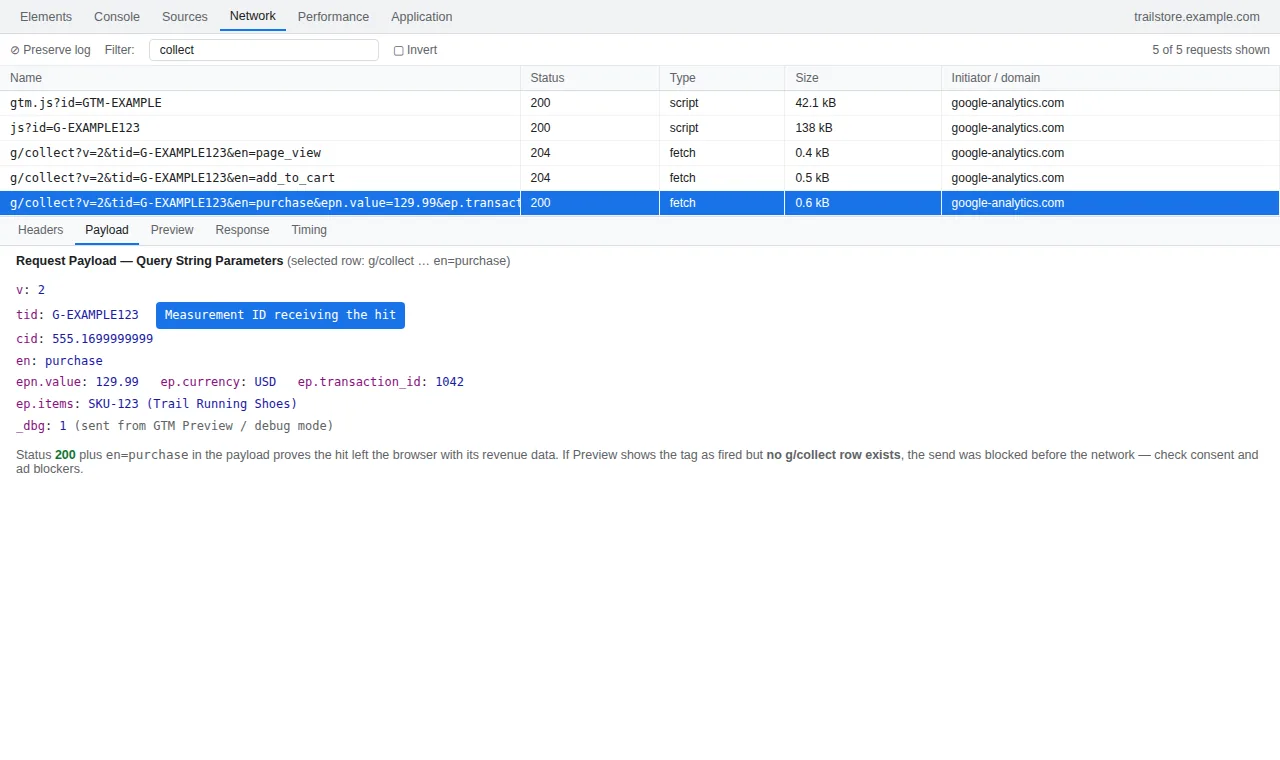
A missing, (not set) or $0-revenue GA4 purchase is almost always one break in the same chain: the dataLayer push never happens, it fires at the wrong moment, the ecommerce object is malformed, or the report is misleading you. Prove the push exists first, then audit the object field by field — the 10 fixes below follow that order.
A broken GA4 purchase event shows up in one of three ways: the purchase never reaches GA4 at all, it arrives but the items say (not set), or it arrives with items and still reports $0 revenue. They look like three problems, but they are almost always one workflow with a break at a different point: the push never happens, happens at the wrong moment, carries a dirty or malformed ecommerce object, or is fine and the report is lying to you. Work through the checks in that order — prove the push exists, prove the tag reads it, audit the object field by field, and only at the end question the reports.
If every event is missing, start with our guide to tags that fire in Preview but not in GA4. This post assumes your other events arrive and the purchase specifically is wrong.
Quick diagnostic: which of the three symptoms do you have?
| What you see | Most likely cause | Go to |
|---|---|---|
| No purchase anywhere, not even DebugView | Push never happens, wrong event name, bad timing | Checks 1, 2, 3 |
| Purchase missing only for some orders or visitors | Offsite gateway return, or consent denied at checkout | Checks 1, 4 |
| Purchase arrives, items show (not set) | Tag not sending ecommerce data, stale object, broken items | Checks 5, 6, 7 |
| Items look right, revenue is $0 | value sent as a formatted string |
Check 8 |
| DebugView shows a value, reports show no revenue | currency or transaction_id missing |
Check 9 |
| DebugView is perfect, the report is wrong | $0 test order, processing delay, thresholds | Check 10 |
Before the checks: what a healthy purchase push looks like
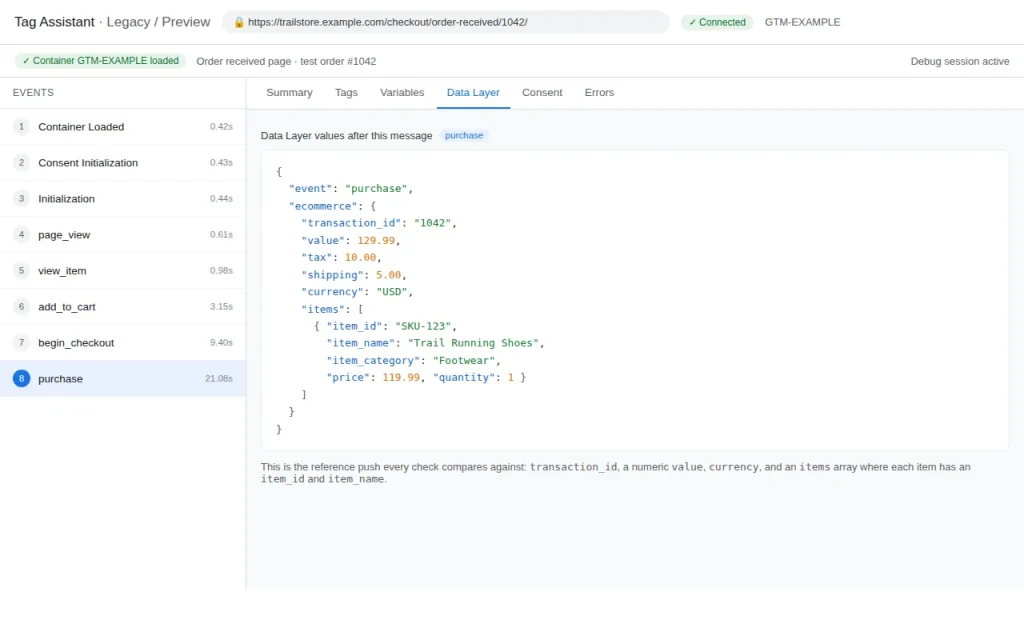
Every check below is a comparison against this push. If yours differs, the difference is usually the bug:
dataLayer.push({ ecommerce: null }); // clear the previous object first
dataLayer.push({
  event: "purchase",
  ecommerce: {
    transaction_id: "1042",
    value: 129.99,
    tax: 10.00,
    shipping: 5.00,
    currency: "USD",
    items: [{
      item_id: "SKU-123",
      item_name: "Trail Running Shoes",
      item_category: "Footwear",
      price: 119.99,
      quantity: 1
    }]
  }
});
Note the details people skip: a clearing push first, value and price as numbers with no symbol or quotes, a currency code, a transaction_id, and items with an ID and a name. The full setup is in our WooCommerce GA4 tracking guide.
Check 1: The purchase push never happens on the thank-you page
Symptom: view_item, add_to_cart, and begin_checkout all appear in DebugView, but purchase never does — for any order.
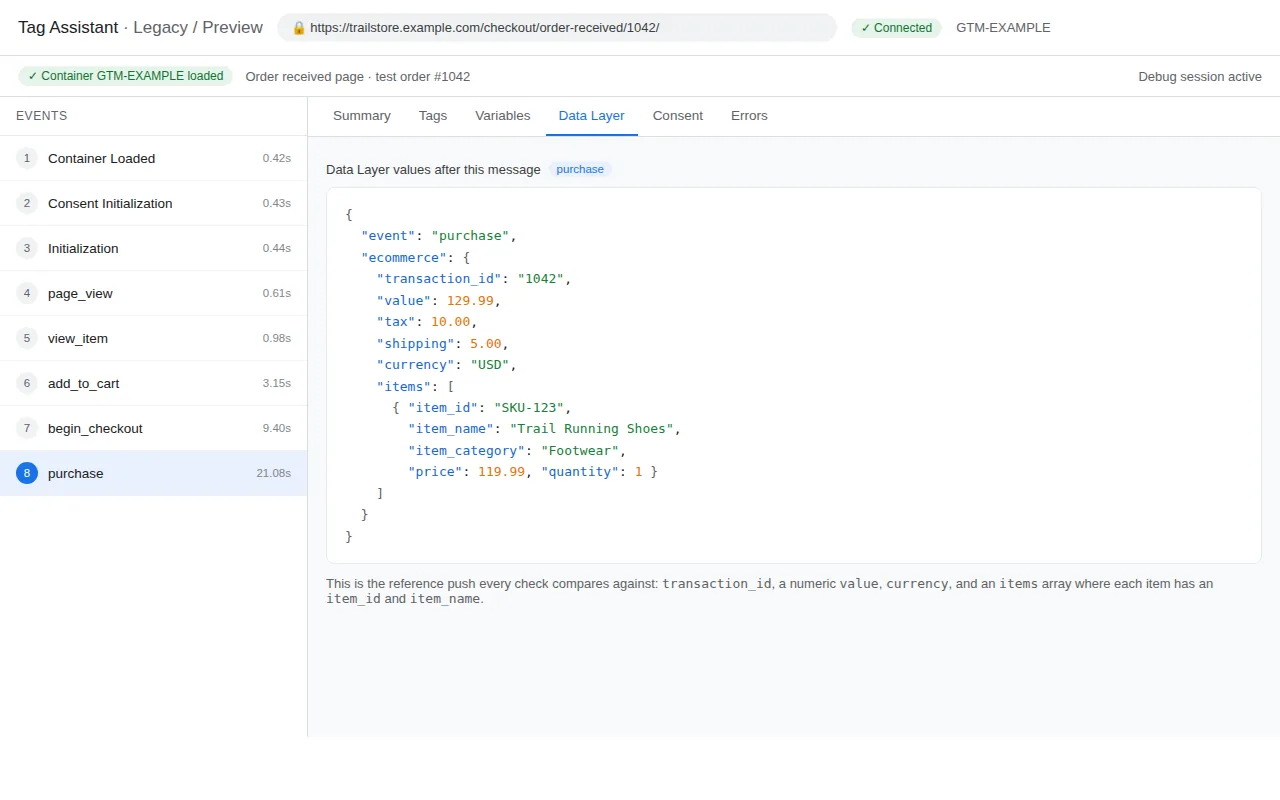
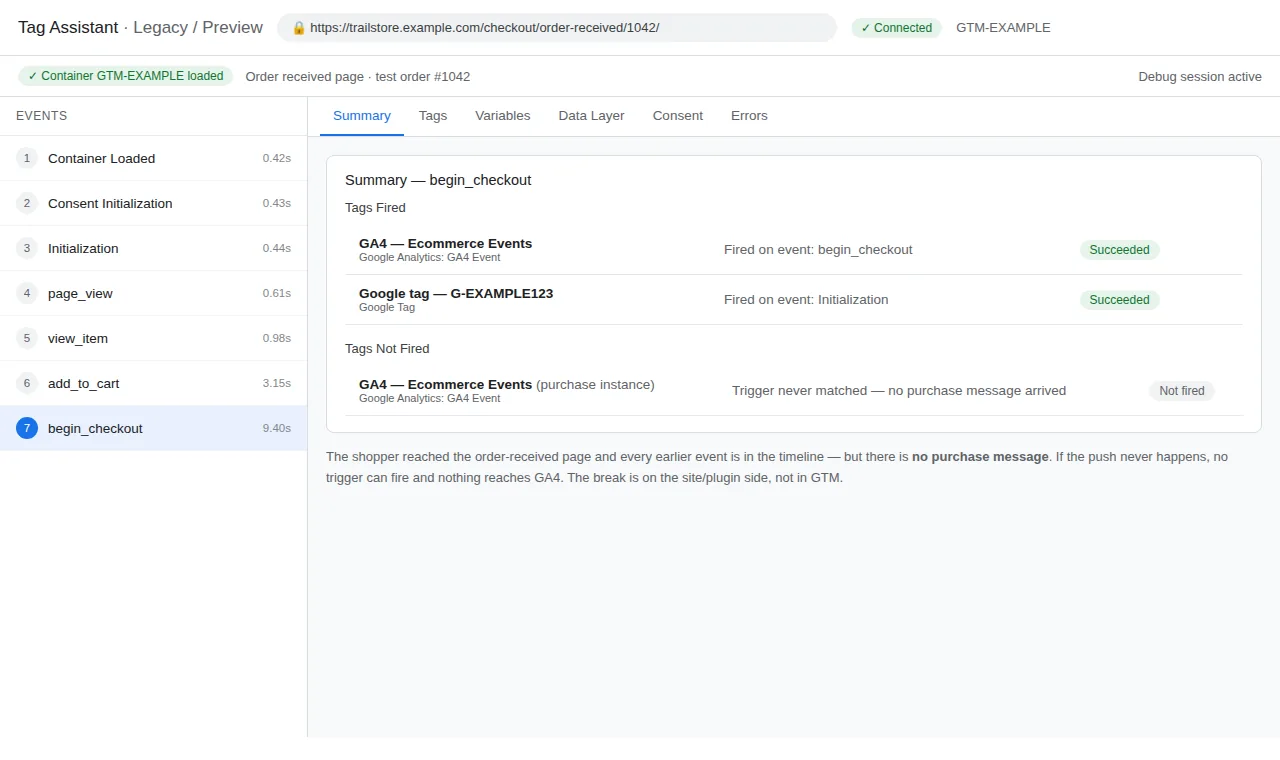
Verify: In GTM Preview, complete a test order and watch the left-hand timeline on the confirmation page. If no purchase entry appears, nothing pushed it, and no tag or trigger can fix that. The usual reason is the payment flow: offsite gateways (PayPal and similar) return customers to a confirmation page where the plugin’s push is missing, fires on a different URL than you are watching, or never runs.
Fix: Make the push happen on the confirmation page, after payment is confirmed, built from the actual order data. In WooCommerce, GTM4WP’s enhanced ecommerce does this for standard flows; offsite gateways often need their return/confirmation hook wired to fire the push. Never push purchase on the Place Order click — clicks happen before payment succeeds, and failed payments will inflate revenue.
Check 2: The event is not named exactly purchase
Symptom: DebugView shows an event after checkout, but the Monetization reports stay empty and no revenue attaches to it.
Verify: In Preview’s timeline, read the event name character by character. GA4 reserves its ecommerce behaviour — Monetization reports, revenue, item reporting — for the exact name purchase, all lowercase. Names like Purchase or purchaseComplete arrive as ordinary custom events GA4 does not treat as a sale.
Fix: Correct the name at the source so the dataLayer event is exactly purchase (and refund for refunds). If the push comes from a plugin you cannot change yet, a GTM trigger on the wrong name feeding a GA4 tag with the name overridden to purchase works as a bridge — but every other platform still sees the wrong name, so fix the push itself soon.
Check 3: The push fires before GTM and the Google tag are ready
Symptom: Purchase tracking is intermittent — works in some tests, vanishes in others, or arrives with empty values.
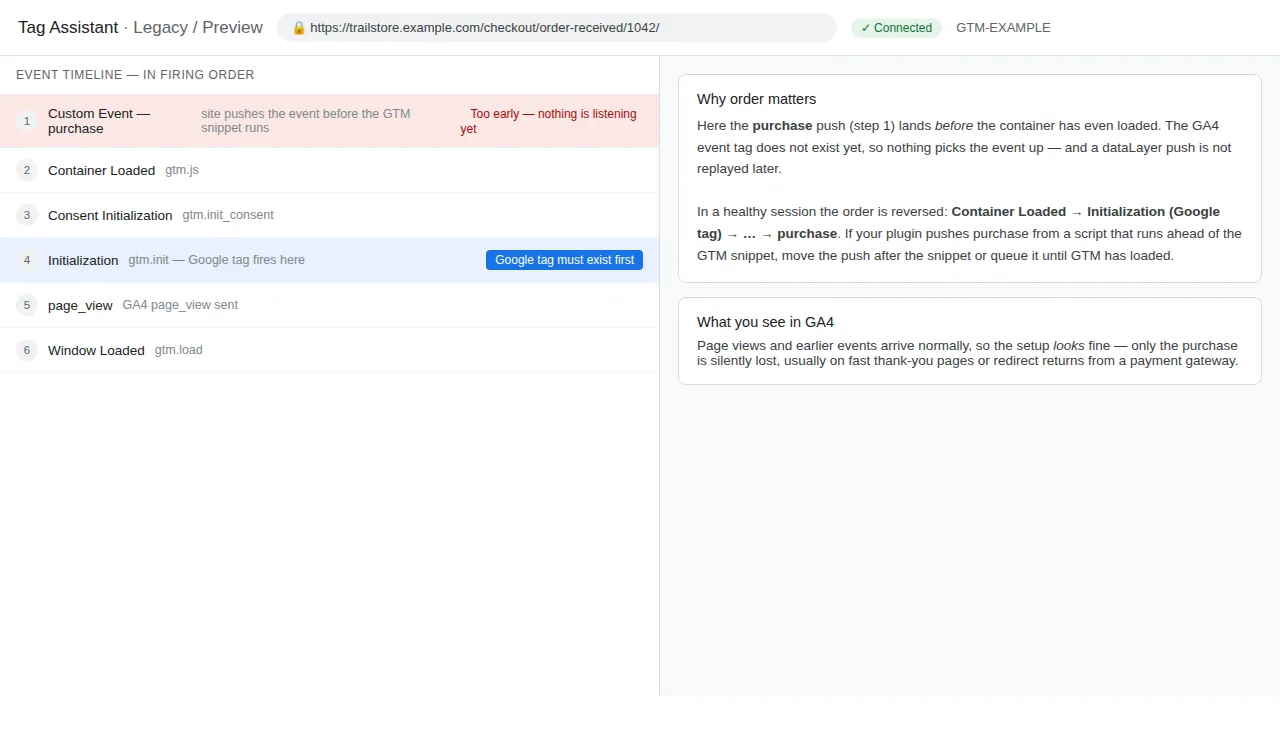
Verify: In Preview, look at the timeline order. If purchase sits above the Initialization and Container Loaded entries, or the GA4 tag shows under Tags Not Fired for that event, the push raced ahead of the setup meant to read it. Common with hand-coded pushes placed high in the page, and confirmation pages that render the push before the order values exist.
Fix: Fire the Google tag on Initialization – All Pages, and push purchase only when the order data exists — when the confirmation renders, not in a script that runs before it. Move custom pushes after the data they need and after the GTM snippet.
Check 4: Consent Mode is blocking the purchase hit
Symptom: Your own tests track perfectly — you accepted the banner long ago — but a slice of real orders never appears in GA4, worst from European traffic.
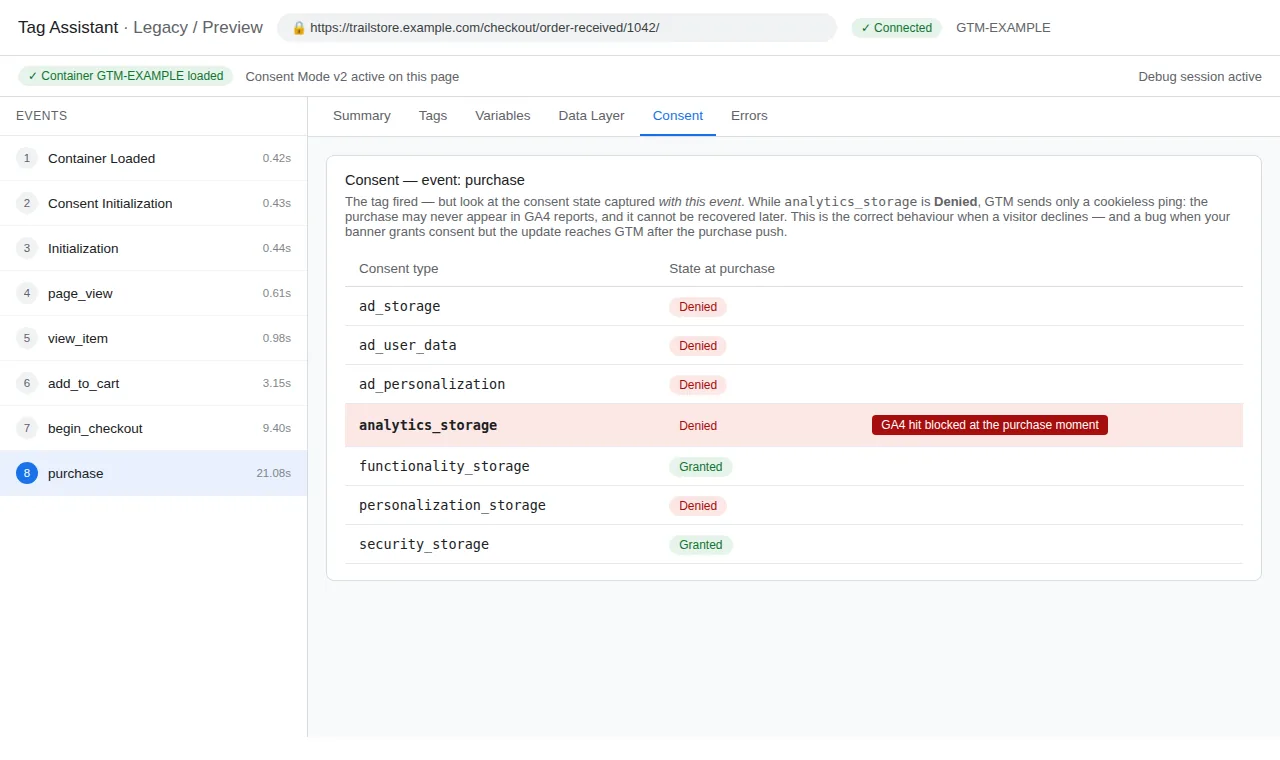
Verify: In Preview, open the Consent tab and complete a checkout without accepting the banner, or after rejecting it. If analytics_storage is “Denied” at the moment of the purchase push, the hit is blocked or reduced to a limited ping that will not show as a normal purchase in DebugView.
Fix: Wire your consent platform so the state is set before checkout completes and updates on choice; test both paths. Our Consent Mode Checker shows what your banner actually sends. Do not force consent to granted to make purchases appear — that fixes a report by breaking the consent the visitor gave.
Check 5: The GA4 tag is not sending the ecommerce object
Symptom: The purchase reaches DebugView as an empty shell — no items, no value, no currency — even though the dataLayer contains all of them.
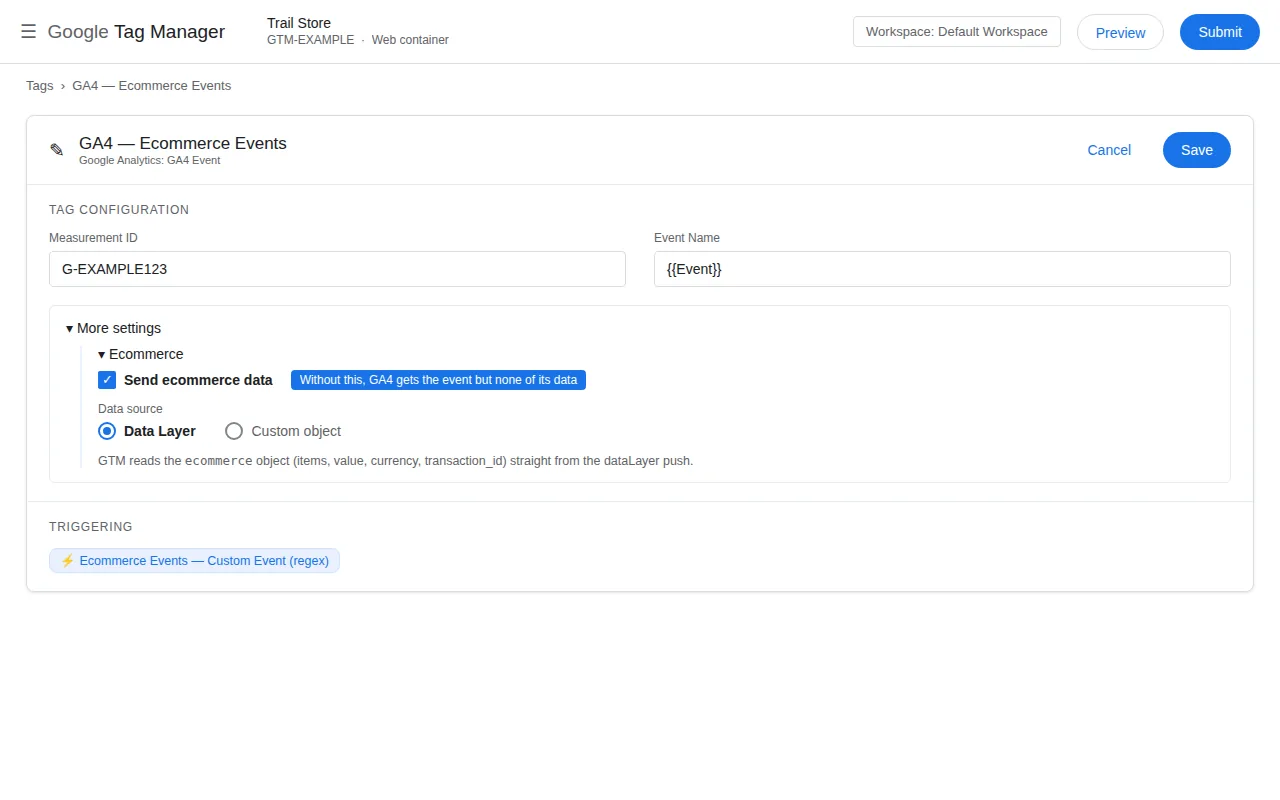
Verify: In Preview, click the purchase event and compare two panels. The Data Layer tab shows the full ecommerce object. Now open the fired GA4 tag: under More Settings → Ecommerce, if “Send Ecommerce Data” is unticked, or the source is Custom with nothing mapped, the tag fires the event name and drops the object. This one setting explains a large share of both (not set) items and $0 revenue.
Fix: Tick Send Ecommerce Data and set Data Source: Data Layer, as in Step 2 of our WooCommerce GA4 guide. Do not compensate by hand-mapping value and items as event parameters — that patches one tag and leaves the dataLayer broken for everything else.
Check 6: The ecommerce object was never cleared
Symptom: The purchase arrives with items the customer did not buy — products viewed or added then removed — or with quantities merged from several steps.
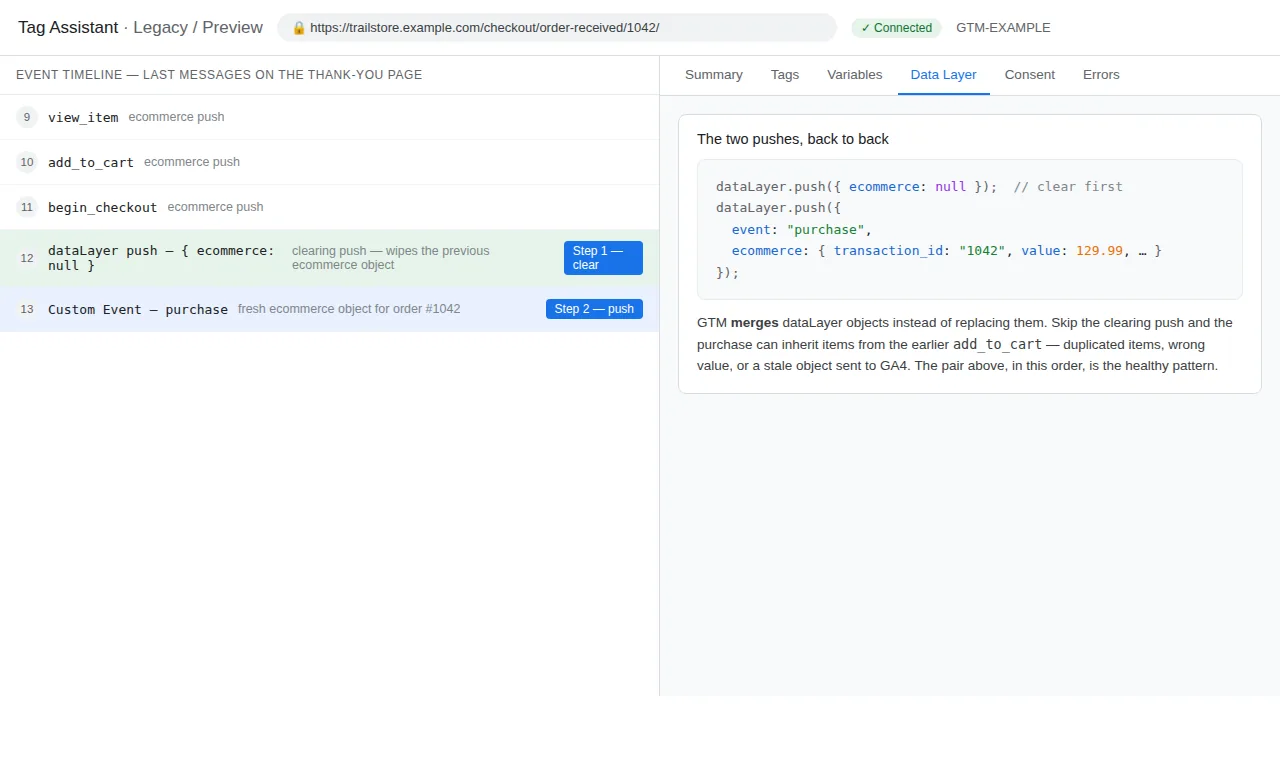
Verify: In Preview’s timeline, examine the pushes around the purchase. A healthy flow shows a push setting ecommerce to null immediately before the purchase push. Without it, GTM merges dataLayer objects across events on the same page, so a stale items array from an earlier add_to_cart survives into the purchase.
Fix: Add dataLayer.push({ ecommerce: null }); immediately before the purchase push — and before every ecommerce event push, not just purchase. GTM4WP does this automatically; hand-written pushes are where it gets skipped.
Check 7: The items array is empty, or missing item_id and item_name
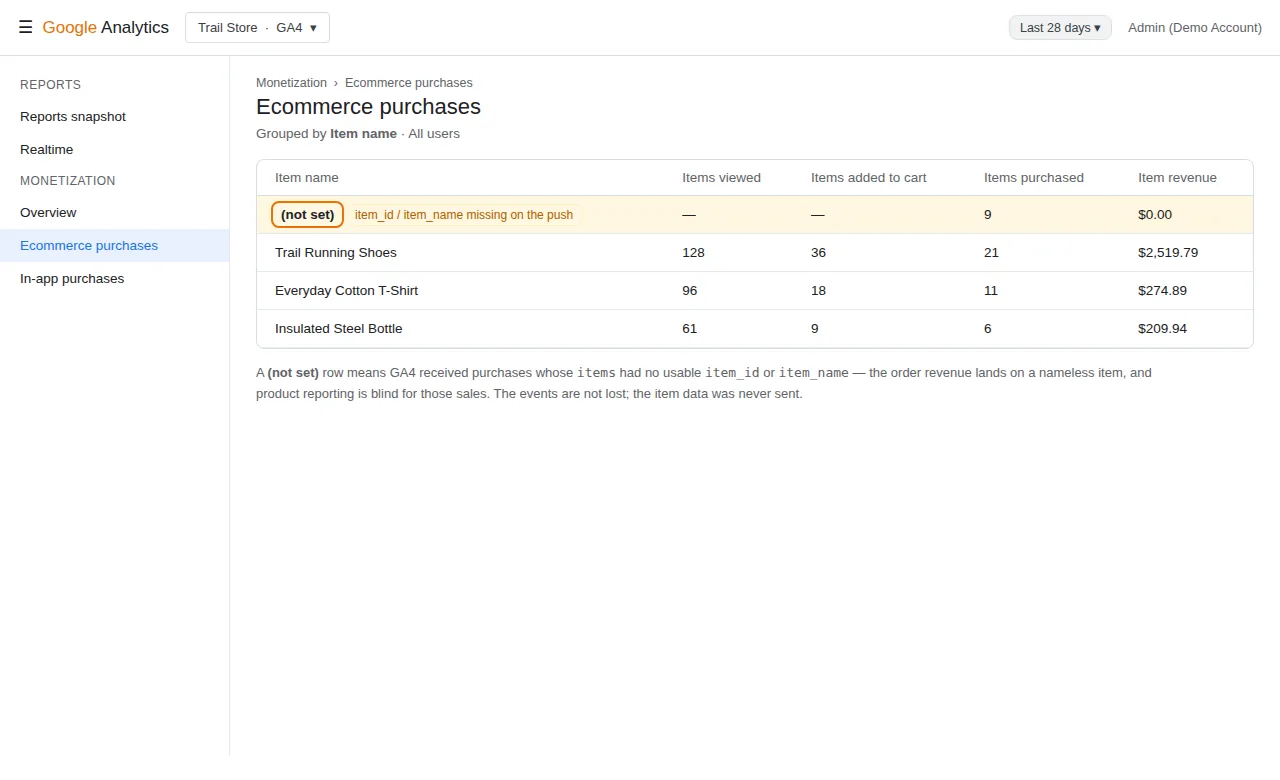
Symptom: The purchase arrives with a correct value, but the item name shows (not set), and item-level reports are empty.
Verify: In Preview’s Data Layer tab for the purchase event, expand items and read what is actually there. Common findings: an empty array, items carrying only price and quantity, or items in the old Universal Analytics shape — nested under a products array — which a GA4 tag cannot read as items at all. GA4 labels items (not set) when the event arrived without usable item data; it describes what it received, it is not a separate bug.
Fix: Push items in GA4 format, each with at least item_id or item_name (send both), plus price and quantity as numbers. If your plugin sends the Universal Analytics format, switch its output to GA4 format — GTM4WP has this setting.
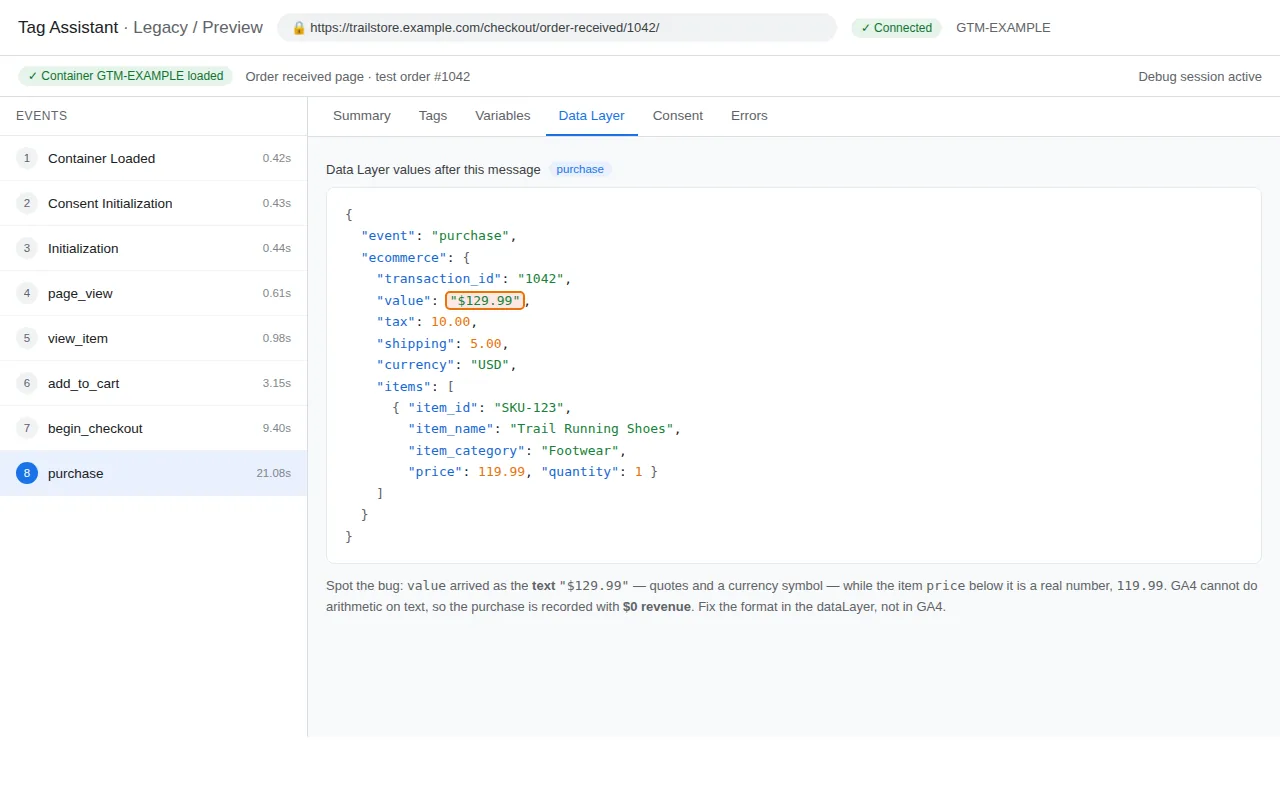
Check 8: value and price are formatted strings, not numbers
Symptom: The event and the items look right everywhere, but revenue totals $0 in every GA4 report.
Verify: In the Data Layer tab, look at the quotes. value: "$129.99" is text formatted for a human — currency symbol, quotation marks. GA4 sums numbers; a formatted string is not summed. The purchase counts, the money does not:
// Broken — formatted for humans, invisible to GA4's totals
ecommerce: {
  value: "$129.99",
  items: [{ item_id: "SKU-123", item_name: "Trail Running Shoes", price: "$119.99", quantity: 1 }]
}

// Fixed — raw numbers, same order
ecommerce: {
  value: 129.99,
  items: [{ item_id: "SKU-123", item_name: "Trail Running Shoes", price: 119.99, quantity: 1 }]
}
Fix: Send raw numbers at the source and let GA4 handle display formatting via the currency field. In WooCommerce this usually means a custom push used a formatted price helper instead of the raw amount. Change the helper, not the report.
Check 9: currency or transaction_id is missing from the push
Symptom: DebugView shows the purchase with a value, yet Monetization revenue is missing — or the same order counts twice after a thank-you page refresh.
Verify: In the Data Layer tab, audit the object field by field against the healthy push at the top. Without currency, GA4 cannot place the value into the property’s reporting currency, and the revenue is dropped from the money reports. Without transaction_id, GA4 cannot recognise a repeat hit for the same order as a duplicate — and neither can Meta, whose Pixel/CAPI deduplication keys on exactly this value, as our WooCommerce Meta guide explains.
Fix: Send both fields on every purchase push: currency as the ISO code (for example "USD") and transaction_id as the store’s unique order ID. Judge duplication by unique transaction IDs in GA4, not raw event counts in Preview.
Check 10: The false alarm — a $0 test order, or a report that has not caught up
Symptom: DebugView shows a textbook purchase, the Monetization report shows $0 or nothing, and you are about to rebuild the whole setup.
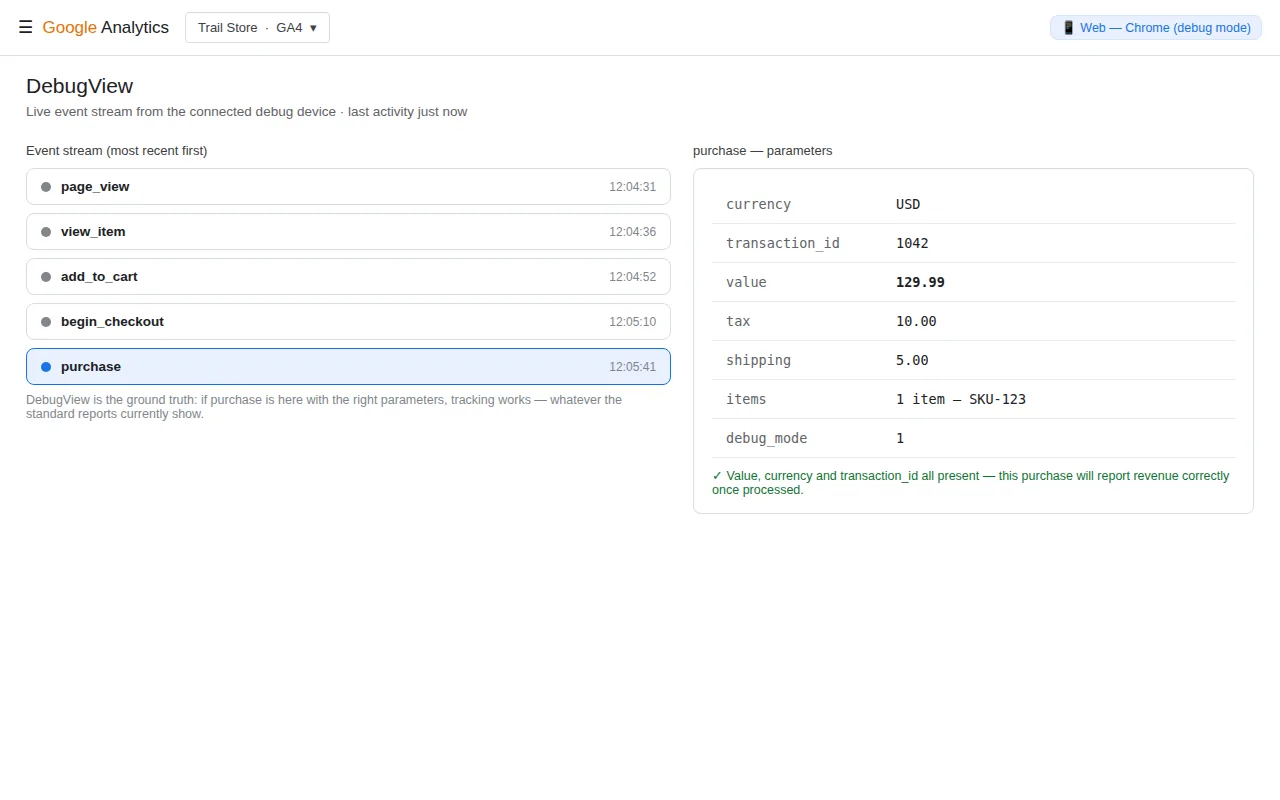
Verify: Ask two questions before touching anything. First, what was the test order actually worth? A 100% coupon or a test gateway makes value: 0.00 the correct data — GA4 is reporting your test faithfully. Second, where are you looking? DebugView is near real time, the ground truth for collection. Standard reports can take 24 to 48 hours to process, and thresholds can hide low-volume rows.
Fix: Test with a real amount, or a partial coupon that leaves a nonzero value, confirm the purchase in DebugView, and check the standard report the next day. If you would rather not wire this by hand, our free GTM container builder generates this setup with tag, trigger, and ecommerce setting connected.
Summary checklist
| # | Check | Pass means |
|---|---|---|
| 1 | Push happens | A purchase entry appears in Preview’s timeline |
| 2 | Event name | The dataLayer event is exactly purchase |
| 3 | Timing | Push lands after Initialization, values present |
| 4 | Consent | analytics_storage at checkout matches the visitor’s choice |
| 5 | Tag setting | Send Ecommerce Data is on, Data Source is Data Layer |
| 6 | Clearing | ecommerce: null is pushed immediately before the purchase push |
| 7 | Items | Every item carries item_id and item_name, in GA4 format |
| 8 | Value format | value and price are raw numbers, no symbols or quotes |
| 9 | Required fields | currency and transaction_id are on every purchase |
| 10 | Evidence | You judged the setup in DebugView, with a nonzero test order |
Frequently asked questions
Why is my purchase event not showing in GA4 at all?
Start in GTM Preview, not GA4. If no purchase entry appears in the timeline on the confirmation page, the push never happens — most often an offsite gateway return or a plugin setting. If it appears under a different name, GA4 treats it as a custom event, not a sale. Consent denial at checkout is the third common cause.
What does (not set) mean next to items in GA4?
It means the purchase arrived without usable item data when it fired: an empty items array, items missing item_id and item_name, items in the old Universal Analytics format, or a tag not sending ecommerce data from the data layer. Read the actual array in Preview’s Data Layer tab.
Why does GA4 show $0 revenue for orders that really had value?
Usually the push sent value as a formatted string such as “$129.99” instead of the number 129.99, and GA4 does not sum text. The other honest cause: a test order paid with a 100% coupon genuinely has a value of 0. Inspect the raw push before changing anything.
The purchase is in DebugView but not in the Monetization report — is it broken?
Almost certainly not. DebugView proves GA4 collected the event. Standard reports take 24 to 48 hours, thresholds can hide low-volume rows, and a missing currency can keep value out of the money reports. Check again tomorrow; audit currency meanwhile.
Does a missing transaction_id really matter if the event fires?
Yes. Without it, GA4 cannot deduplicate the same order when the thank-you page is refreshed, so one order can count as several purchases. It is also the value Meta uses as the event_id to deduplicate Pixel and Conversions API copies of the same purchase.
My purchase fires twice. Is that covered here?
That is the mirror problem: two senders — a plugin, a theme snippet, or a hardcoded tag — or the same push repeating on refresh. Look for two senders first, and judge it by unique transaction IDs. Our WooCommerce GA4 guide covers the duplicate cases in its troubleshooting.