Meta CAPI Deduplication Not Working? The event_id Checks and Fixes
Quick answer
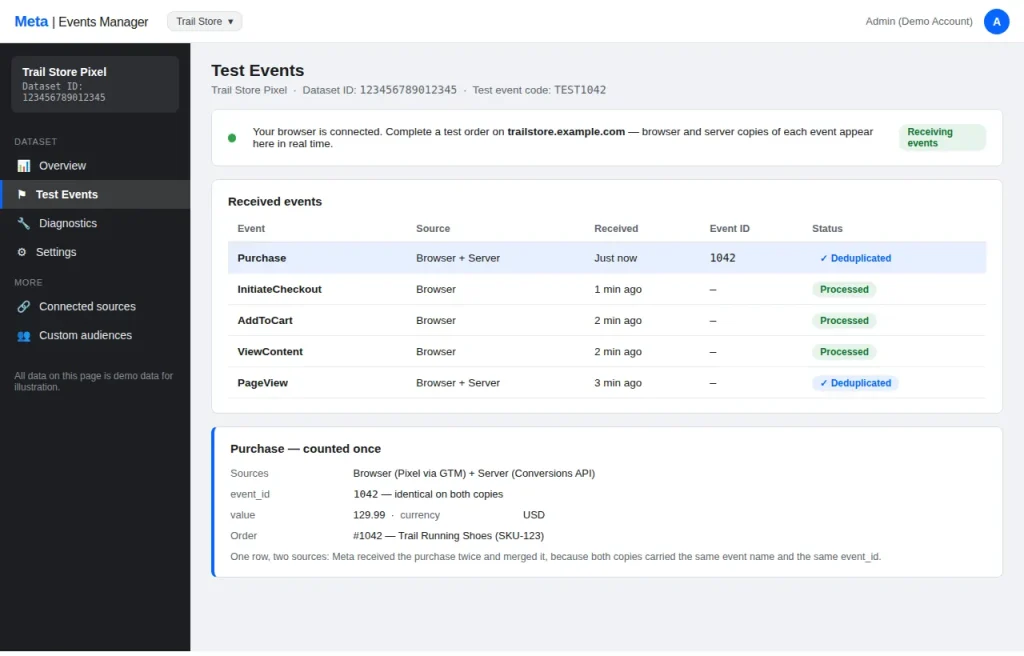
Meta merges a browser event and a server event only when both carry the same event_name and the same event_id, on the same Pixel. In most broken setups the two sides generate different IDs — or one side sends none. Read the failure’s shape in Test Events first; the eight causes below cover almost every unmerged setup.
You did the right thing: the Meta Pixel still fires in the browser, and the Conversions API now sends the same events from the server. Two copies, one customer action. The setup is meant to deduplicate them — but in Ads Manager the numbers are double, or the server events are missing entirely, or the pixel’s Test Events shows both copies and nothing merges.
Deduplication is not automatic. It is a matching exercise, and it only works when the two copies agree on three fields. When they do not, Meta keeps both. This guide explains how that matching actually works, then works through the eight ways it breaks, in the order you should check them.
How event_id matching actually works
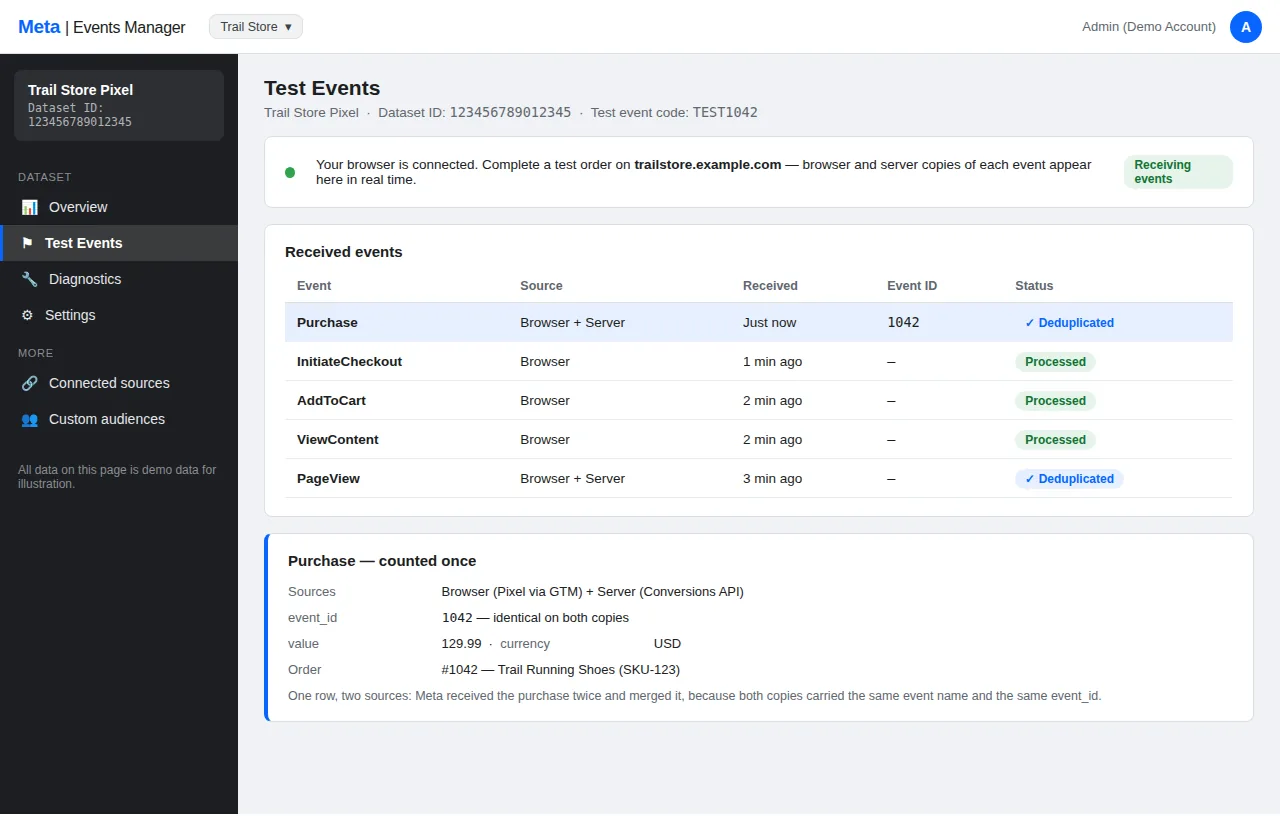
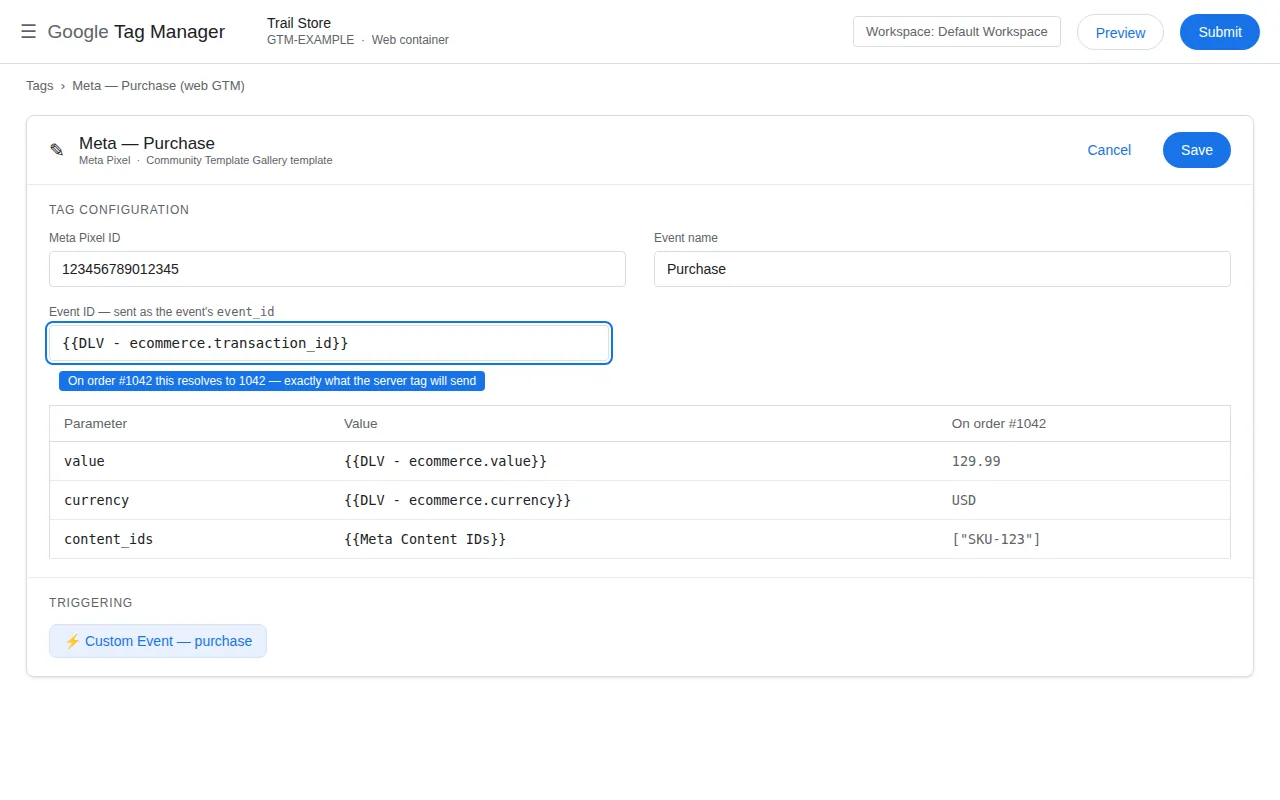
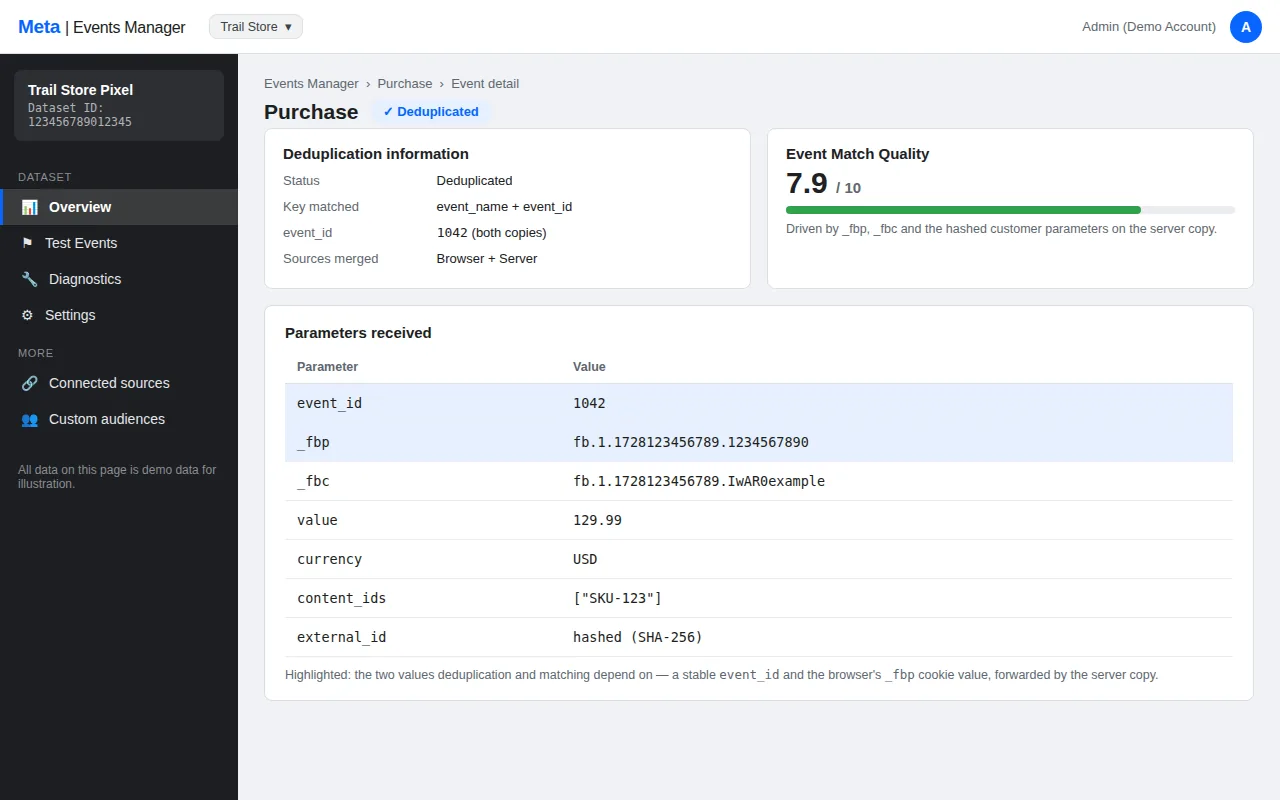
When the same action reaches Meta twice — once from the browser, once from the server — Meta compares the two copies. The event_id is the key: a unique value attached to a single event occurrence. The browser copy carries it in the pixel’s eventID parameter; the server copy carries it in the event_id field of the API payload. If they match, Meta keeps one copy. If they do not match, both count.
That is the entire mechanism, and it is also where most guides stop — which is why most deduplication setups fail. The matching is exact, and it depends on three fields, not one:
| If the field is | Deduplication will |
|---|---|
| Identical on both copies | Deduplicate to one event |
| Different on the two copies | Keep both — the events count twice |
| Missing on one copy | Keep both — Meta cannot match what it cannot see |
| Present but in the wrong format | Keep both — a string and a number are different values |
The rule to remember is this: deduplication is an equality check on event_id, event_name and event_time. If any one of the three is different, there is no match. If all three are identical, there is. Every cause below is a different way for one of those three fields to disagree.
The 8 causes
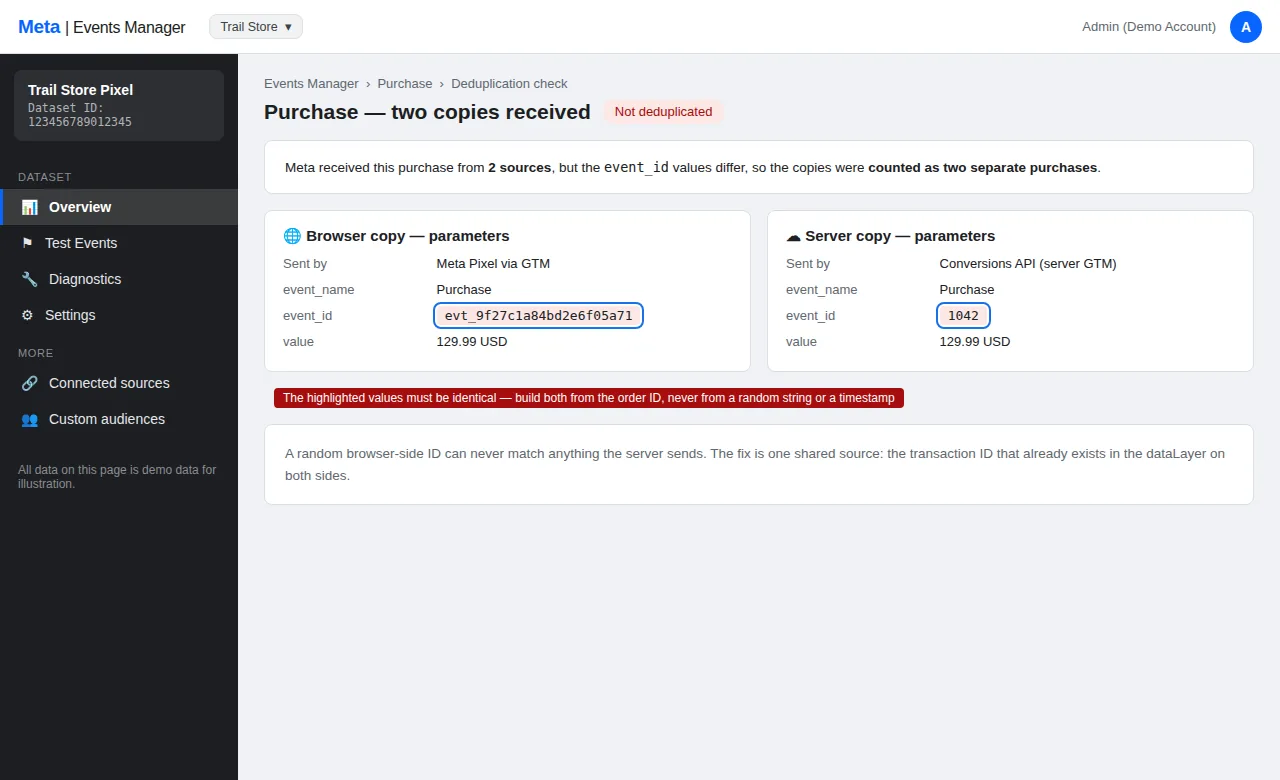
1. The two copies have different event_ids
Symptom: Both copies appear in Test Events, with different event_id values, and Ads Manager counts the action twice.
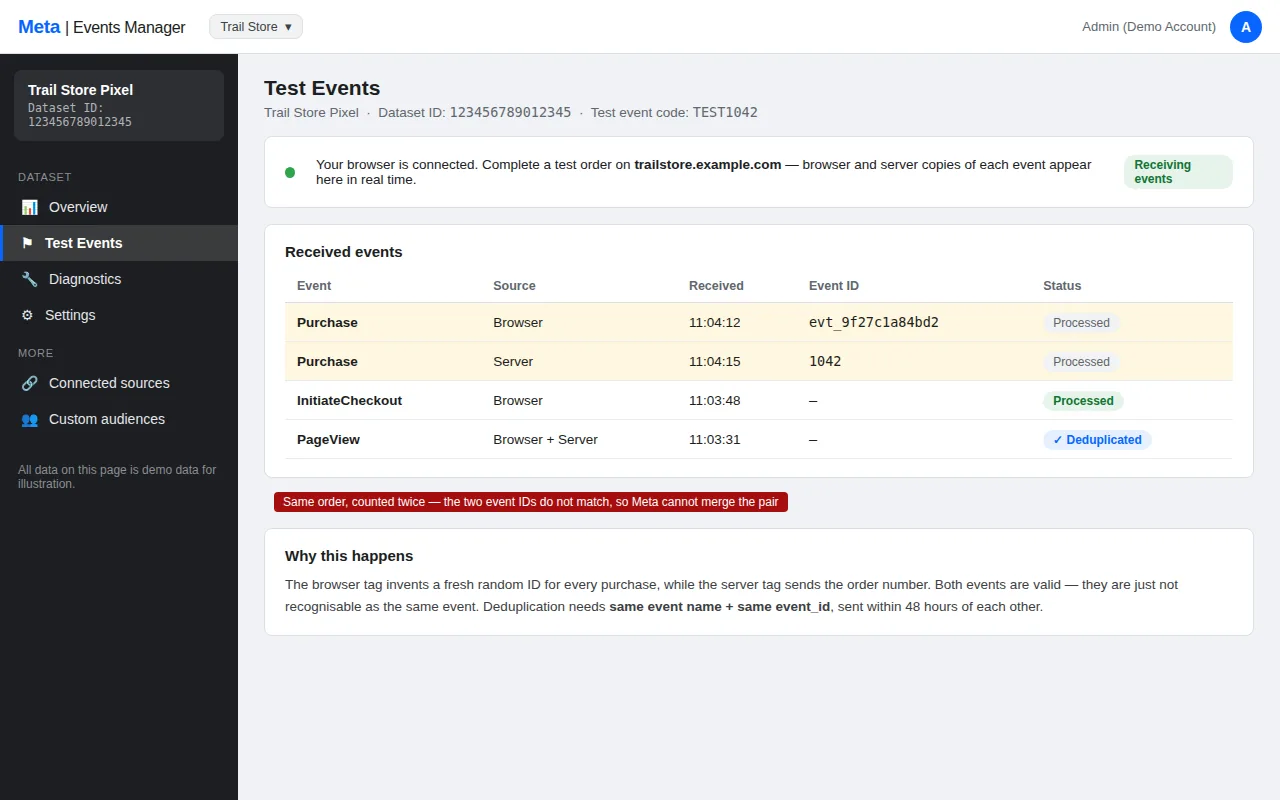
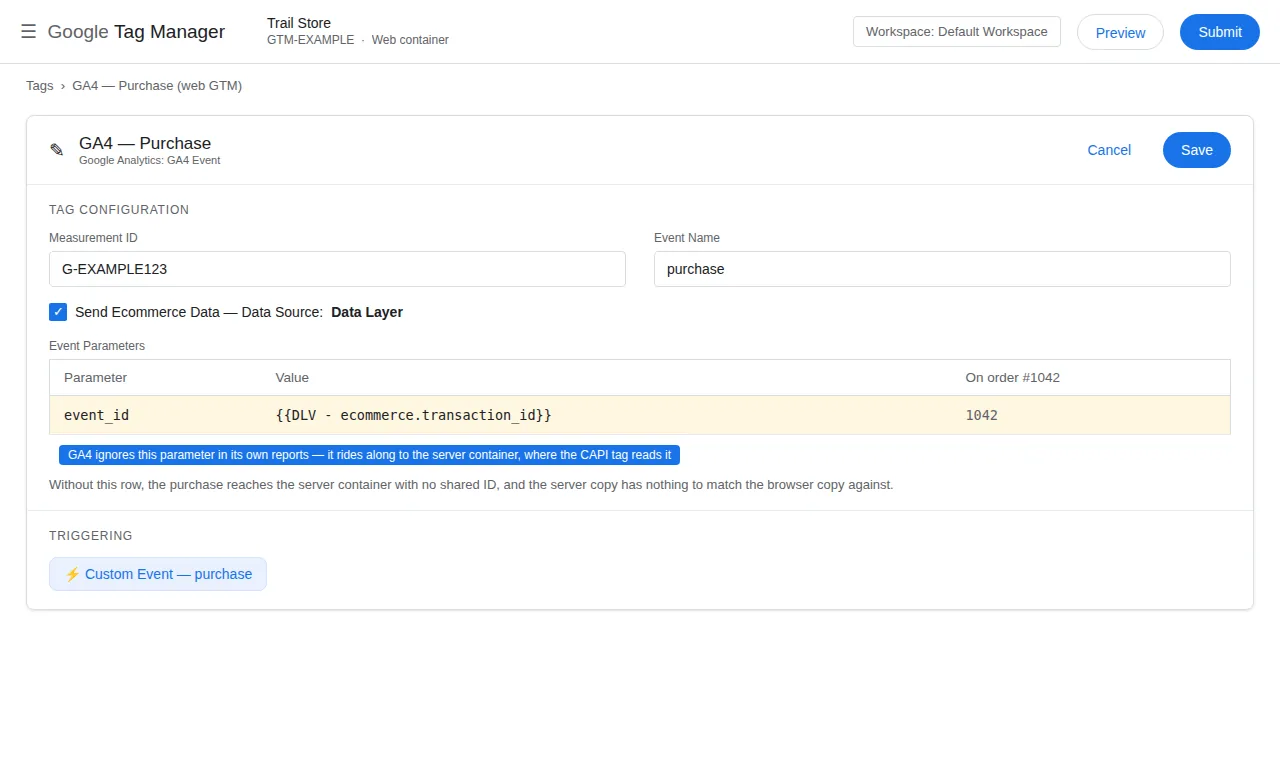
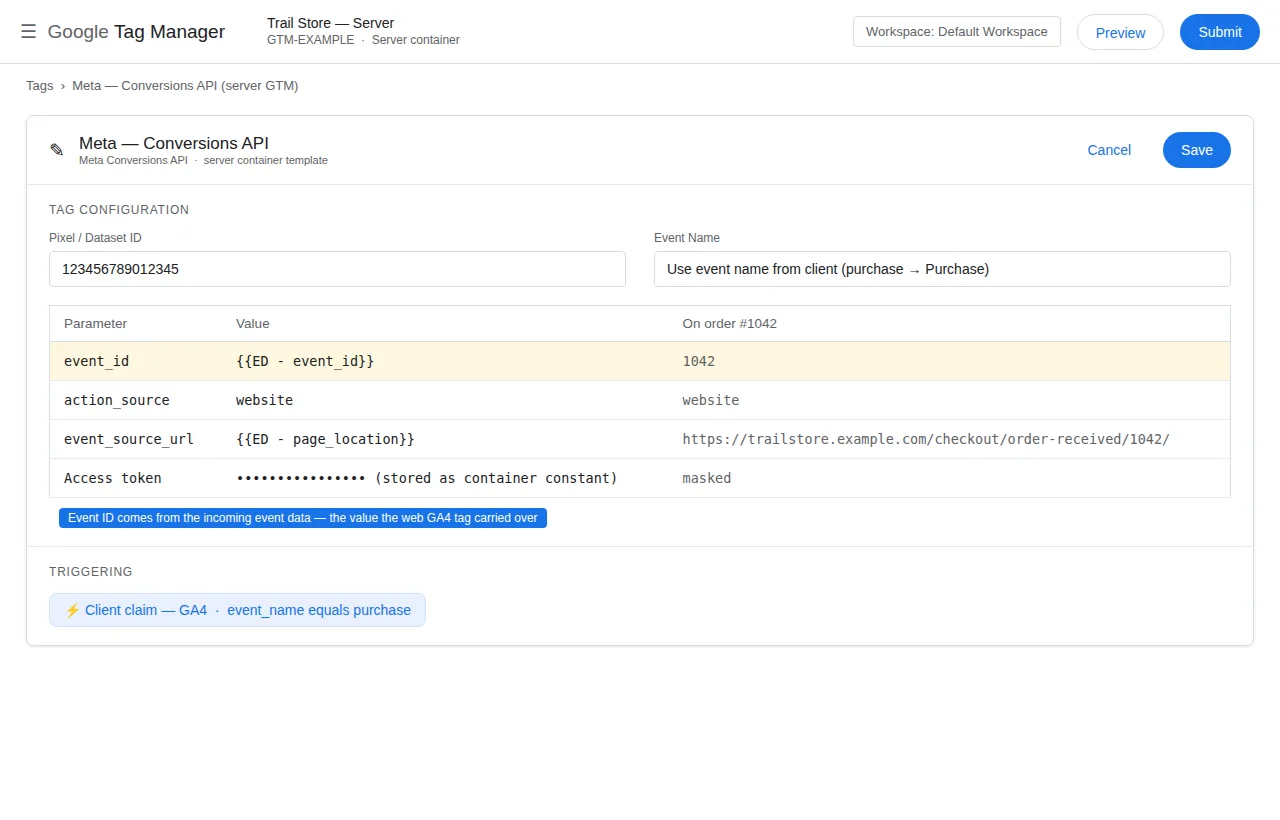
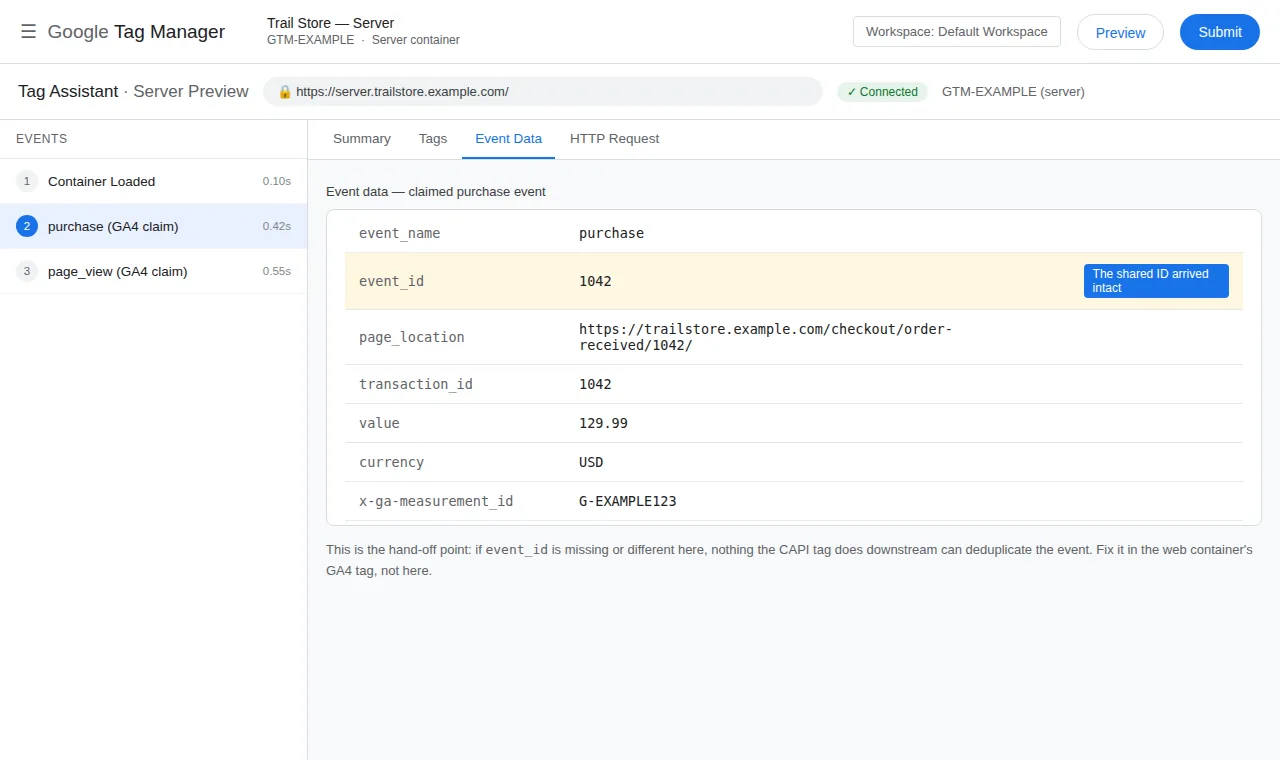
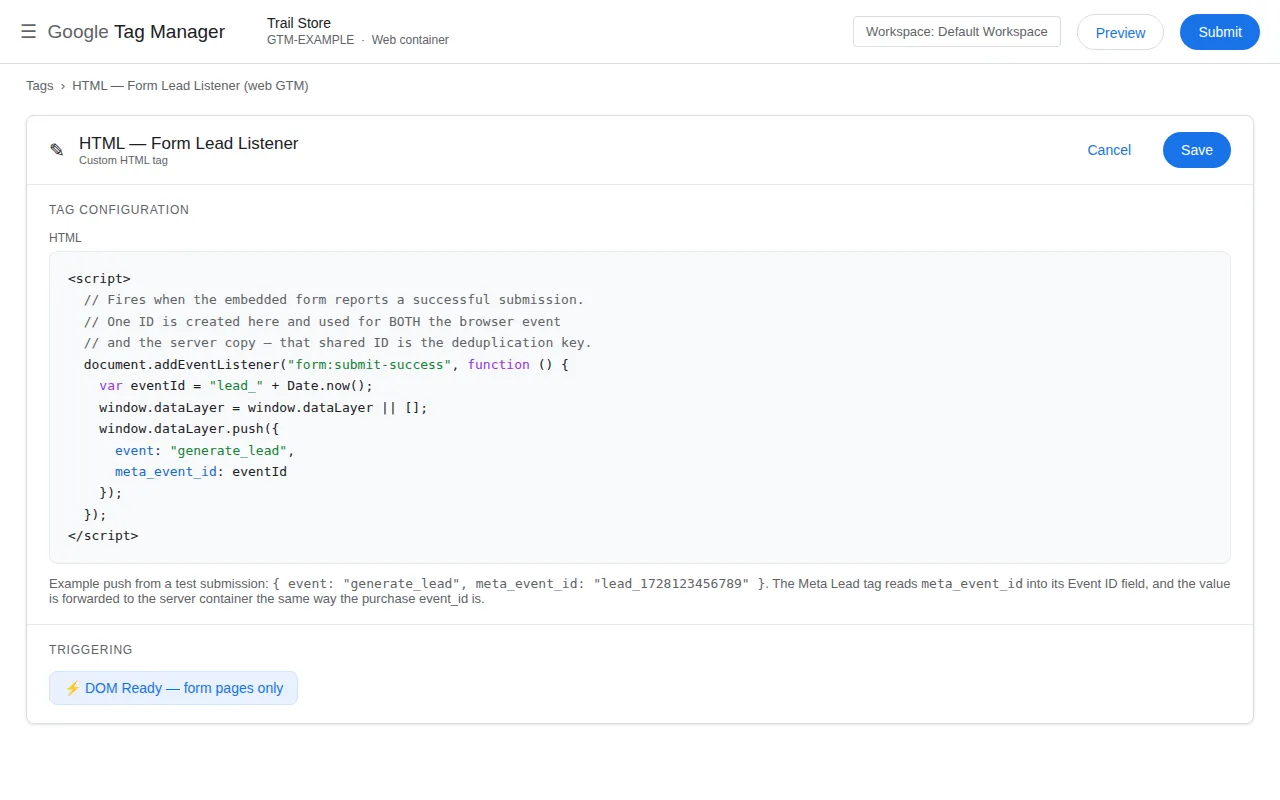
Fix: Generate the event_id once, and carry it through both channels. The usual pattern is to generate it where the event first happens — on the web — and pass it to the server in the same request that carries the event. If the web tag and the server tag each generate their own ID, they will never match. In GTM, set the event_id in the web tag’s Event ID field (or the pixel’s eventID parameter), and make the server tag read the same value from the request — never generate a second one. Then test in Test Events: the two copies should show the same event_id.
2. The event names do not match
Symptom: One copy is called Purchase and the other CompletePayment, or one is Lead and the other SubmitForm — and neither deduplicates.
Fix: Meta’s standard event names are exact strings. The browser and server copies must use the same name, in the same case. In GTM, check the event name in the web tag and the server tag — a single character’s difference breaks the match. If you renamed an event in one channel and not the other, rename it back. Then test: the two copies should appear under one name in Test Events.
3. The event_time is too far apart
Symptom: The two copies appear in Test Events, but hours apart — and Ads Manager counts both.
Fix: Meta deduplicates events that arrive within a window — roughly 48 hours for most events. If the server copy arrives days after the browser copy, or the server’s clock is wrong, the match fails. Check the server’s clock first: a server running minutes or hours off will timestamp its events wrong. Then check that the server tag sends the event promptly, not in a batch hours later. If the delay is structural — a nightly batch, for example — the events will not deduplicate, and the fix is to send them in real time.
4. The server event has no event_id at all
Symptom: The browser copy appears in Test Events with an event_id, but the server copy has none — and both count.
Fix: The server tag is not sending an event_id. In the server container, check that the tag’s event_id field is populated — usually from the incoming request’s event_id parameter. If the field is empty, the tag is either misconfigured or the web tag never sent the ID. Trace the request in the server Preview: if the event_id is missing there, the problem is upstream, in the web tag. If it is present in the request but not in the tag, the problem is the tag’s field mapping.
5. The server is sending duplicates of its own
Symptom: Test Events shows two server copies of the same event — or a server copy and a pixel copy with the same event_id — and the count is still double.
Fix: Two server tags are firing for the same event, or the server container is receiving the event twice. In the server Preview, count how many times the tag fires for one purchase. If it fires twice, check for duplicate triggers — or two clients claiming the same request. If the request itself arrives twice, the web tag is forwarding the event twice. Fix the duplication at the source: one event, one request, one tag fire.
6. The pixel is firing twice in the browser
Symptom: Test Events shows two browser copies of the same event, with different event_ids.
Fix: The pixel is installed twice — once in GTM and once hardcoded in the theme, or once in each of two GTM containers. Search the page source for the pixel ID: if it appears twice, one installation has to go. The usual culprit is a plugin that installs the pixel alongside GTM, or a theme that hardcodes it. Remove the duplicate, then test: one browser copy should remain.
7. A third-party plugin is sending its own copy
Symptom: The event appears three times in Test Events — browser, server, and a third copy you did not send.
Fix: A plugin — WooCommerce’s Meta integration, a Shopify app, or a WordPress plugin — is sending its own Events API copy with its own event_id. That copy will never deduplicate against yours, because its event_id is different. Either disable the plugin’s sending and keep GTM as the single sender, or disable GTM’s sending and keep the plugin. One sender, one event_id, one deduplication. The WooCommerce + Meta hub and the WordPress + Meta hub show the single-sender setup for each platform.
8. The event_id is generated per channel, not per event
Symptom: Every event has a different event_id on each channel, and nothing ever deduplicates.
Fix: The event_id must be unique per event occurrence, not per channel. If the web tag generates a random ID and the server tag generates a different random ID, they will never match — the IDs are different by design. Generate the ID once, where the event happens, and carry it through. A good event_id is the order ID for a purchase, or a UUID generated at the moment the event fires — the same value, in both copies.
A 5-step diagnosis, in order
Work this list from the top. Stop as soon as you find the mismatch — that is the cause:
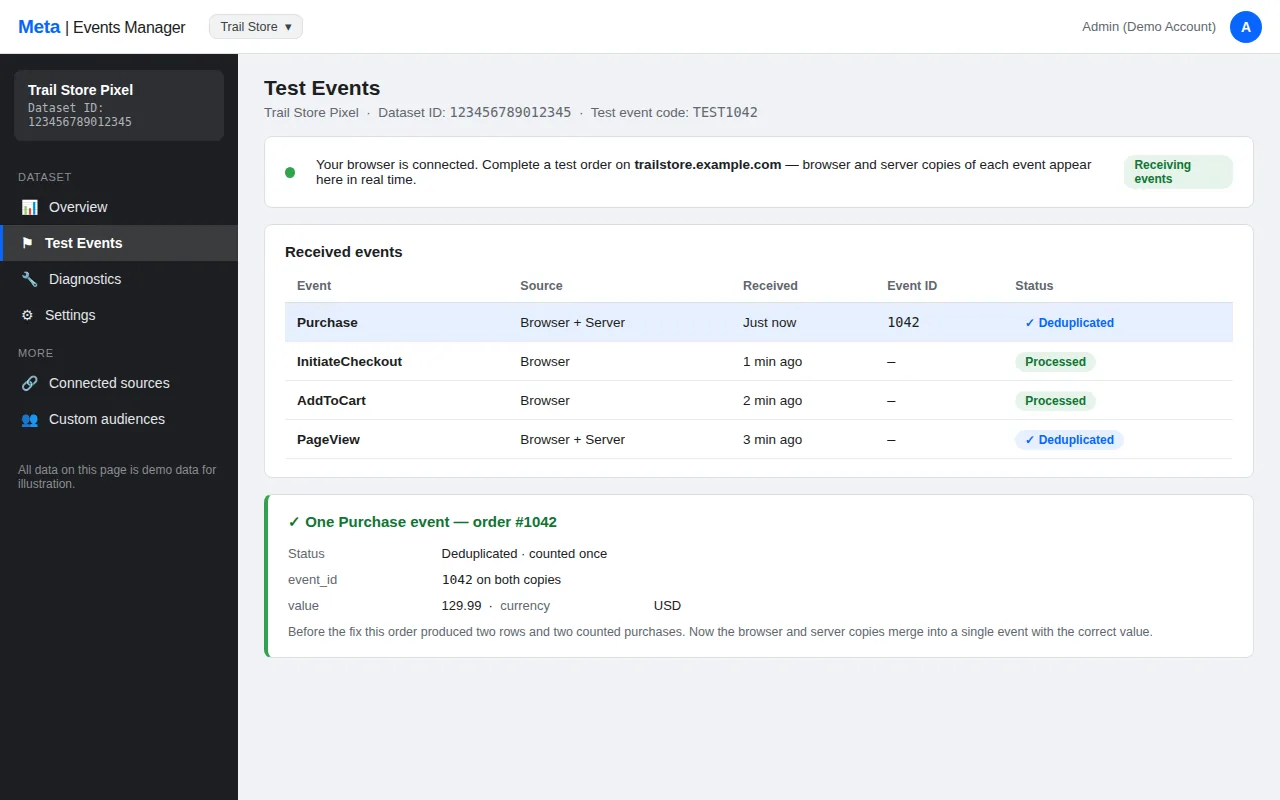
- Open Test Events and find the event. Count the copies: one, two, or three?
- Compare the
event_idvalues. Same, different, or missing? - Compare the event names. Same string, same case?
- Compare the
event_timevalues. Minutes apart, or hours? - Count the senders. Is there a plugin, a second container, or a hardcoded pixel sending its own copy?
If the copies match on all three fields and still count twice, the problem is not deduplication — it is duplication. Something is sending the event twice, and the fix is in the sender, not the matcher.
The rules worth writing down
Three rules cover every deduplication failure on this site:
- Generate the
event_idonce, where the event happens, and carry it through both channels. - Use the same event name, in the same case, on both copies.
- Send the server copy promptly, with the server’s clock correct.
Write those three rules on the container’s documentation page. Every future deduplication failure will be one of them.
What to do when it still does not work
If the three fields match and the events still count twice, check these:
- Is the server tag actually firing? Check the server Preview for the event.
- Is the pixel’s
eventIDparameter set? Check the web tag’s Event ID field. - Is there a second sender? Search the page source for the pixel ID.
- Is the
event_timewindow the issue? Check the server’s clock and the send delay.
If none of those fit, the problem is upstream of deduplication: the event itself is being sent twice. The duplicate purchase events in GA4 guide covers the same sender problem in GA4, and the GTM Container Builder builds a single-sender setup from scratch.
Frequently asked questions
Why do my events count twice even though I set up CAPI?
Because deduplication needs three fields to match — event_id, event_name and event_time — and one of yours does not. The most common cause is two different event_ids: the web tag and the server tag each generate their own. Generate the ID once, carry it through both channels, and test in Test Events.
Does deduplication work if the server event arrives later?
Yes, within a window — roughly 48 hours for most events. If the server copy arrives days after the browser copy, or the server’s clock is wrong, the match fails. Send the server copy promptly and check the server’s clock.
What is event_id, exactly?
A unique value attached to a single event occurrence — one ID per purchase, per lead, per page view. The browser copy carries it in the pixel’s eventID parameter; the server copy carries it in the event_id field. If the two values are identical, Meta keeps one copy; if they differ, both count.
Can I deduplicate without event_id?
No — not reliably. Meta can match on other fields in some cases, but event_id is the only key you control. Without it, you are relying on Meta’s heuristics, and the events will usually count twice. Always send an event_id.
My Test Events shows one copy, but Ads Manager counts two. Why?
Test Events shows what Meta received in the test session; Ads Manager shows what it counted. If the two copies arrived with different event_ids, or outside the window, both count — and Test Events will show both copies if you look at the right time range. Check the event_id values first.
Does the pixel need an event_id too?
Yes. The browser copy carries the event_id in the pixel’s eventID parameter. If only the server copy has one, there is nothing to match against. Set the Event ID field in the web tag, and make the server tag read the same value.