Duplicate Purchase Events in GA4: 8 Causes, a 5-Minute Diagnosis, and Fixes That Hold
Quick answer
Duplicate purchase events in GA4 come from two senders formatting the same order differently, a repeated push with a missing or changing transaction_id, or two base installations — almost every duplicated store has exactly one of eight causes. Identify the duplicate shape first with the 5-minute diagnosis below, then fix that cause.
Your store took 100 orders yesterday. GA4 says 137 purchases and revenue to match. Nothing is “broken” in an obvious way — every tag fires, every test order arrives — and yet the numbers are quietly, confidently wrong, and every report, audience and imported conversion downstream inherits the error.
Duplicate purchases are the mirror image of the missing-purchase problem (covered in GA4 Purchase Missing, Items (Not Set) or $0 Revenue?): there, nothing arrives; here, everything arrives twice. This guide works in three passes — first prove the duplication and identify its shape, then understand exactly what GA4 already removes for you (and the conditions it silently requires), then fix the cause. There are eight causes. Almost every duplicated store has exactly one of them.
The 5-minute diagnosis: what shape is your duplicate?
Do not start by opening GTM. Start by learning what kind of duplicate you have, because each shape points at a different cause.
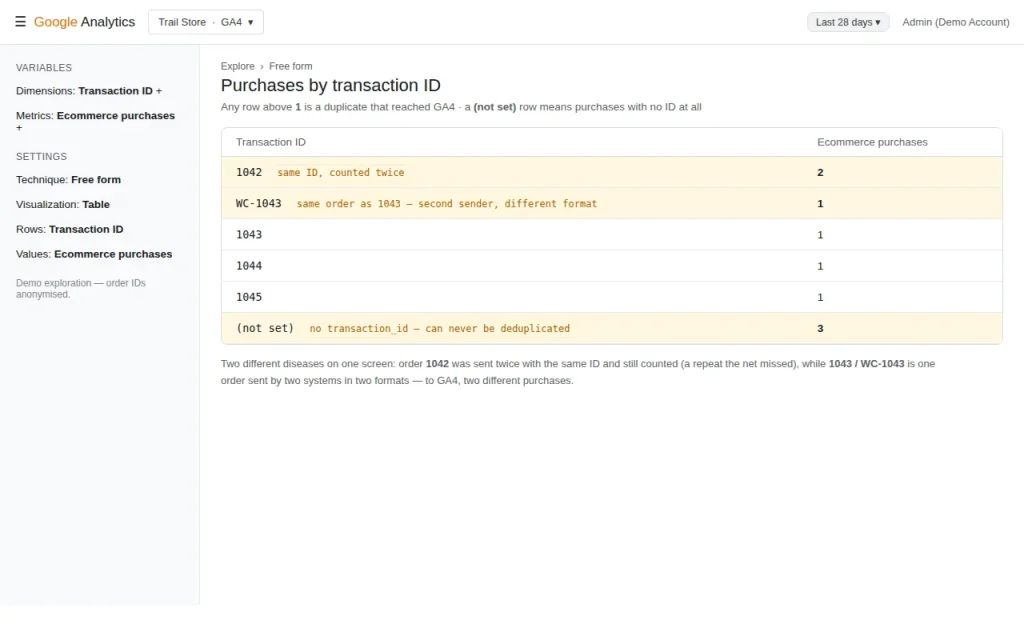
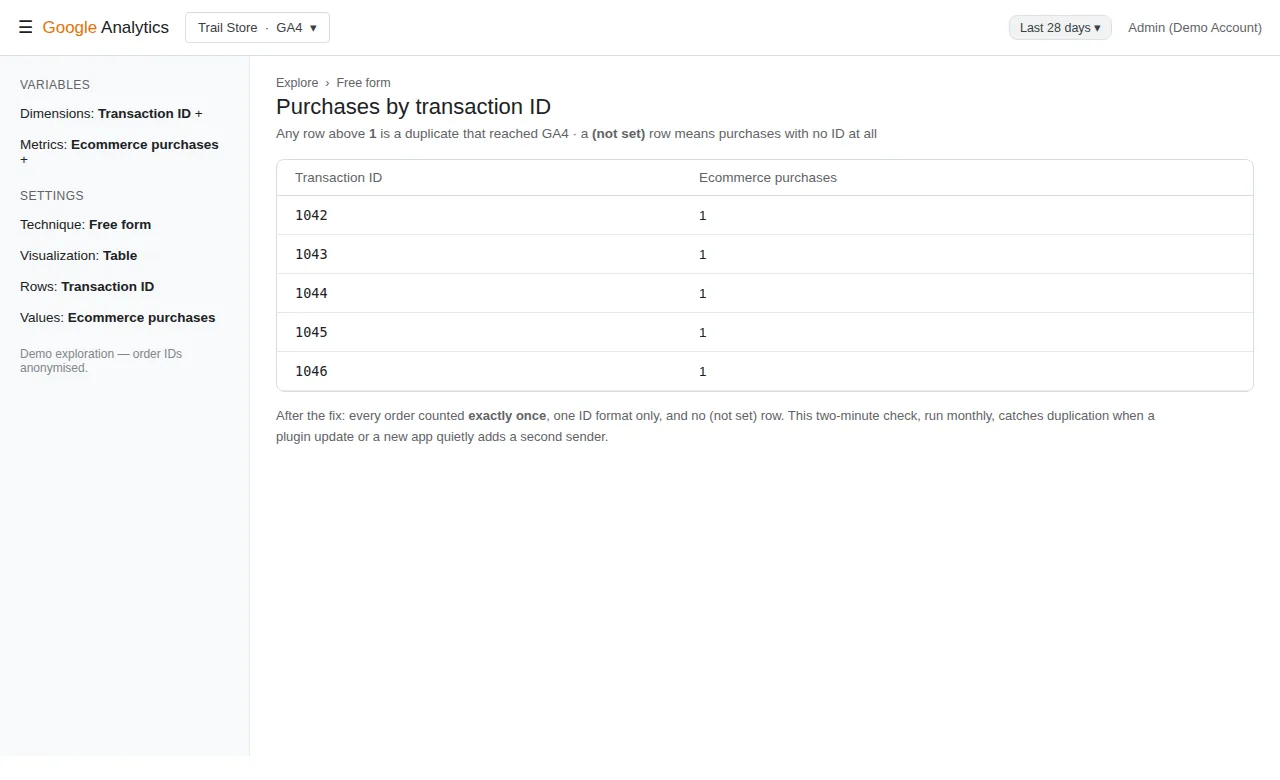
Check 1 — The transaction ID table (2 minutes). In GA4, open Explore → Free-form, add the dimension Transaction ID and the metric Ecommerce purchases, over a few recent days. Read the shapes:
| What you see | What it means |
|---|---|
| One order ID with a purchase count of 2 (or more) | The same purchase was sent repeatedly with the same ID — and still counted. Look at causes 3, 5 and 7. |
The same order appearing twice in different formats (e.g. 1042 and WC-1042, or an order ID and a long checkout ID) |
Two senders, each formatting the ID its own way. GA4 sees two different purchases. Cause 1. |
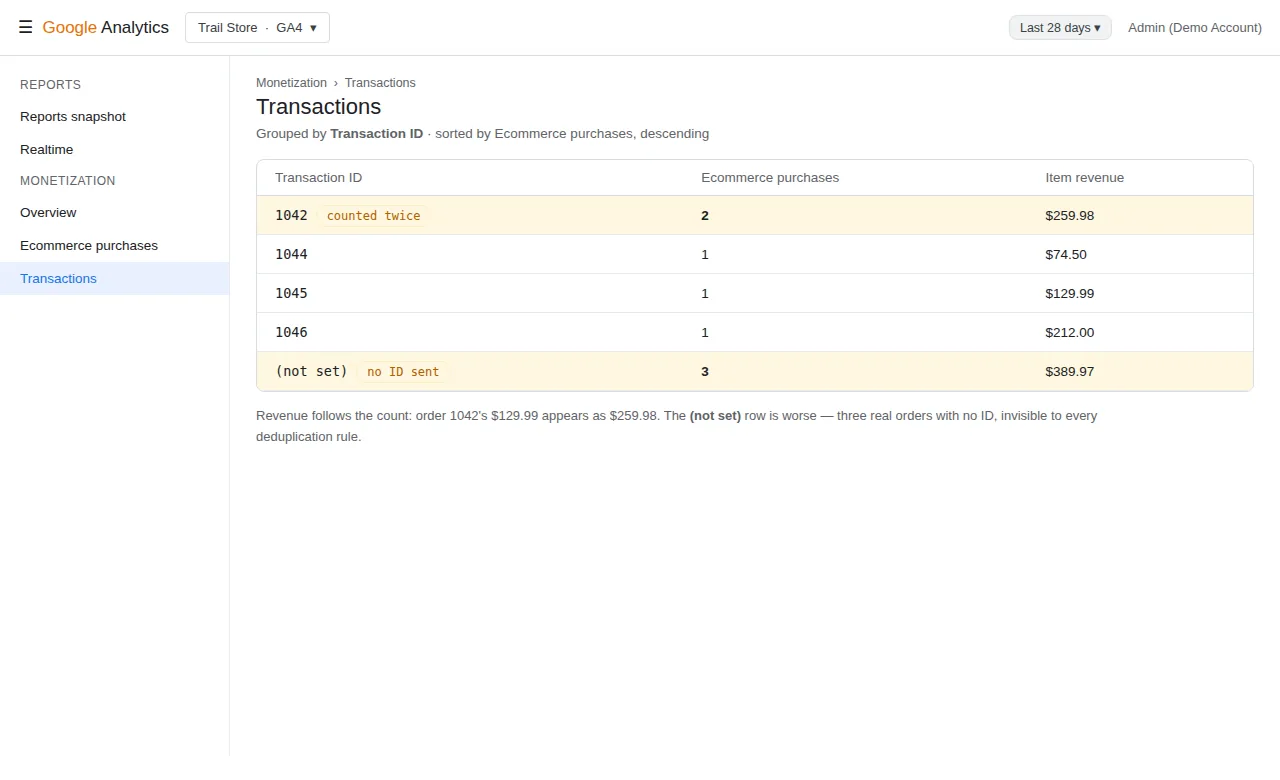
| A (not set) row carrying purchases | Some purchases arrive with no transaction_id at all — those can never be deduplicated by anyone. Cause 4. |
| Counts of exactly 2× on everything, pageviews included | Two base installations, not a purchase problem. Cause 2. |
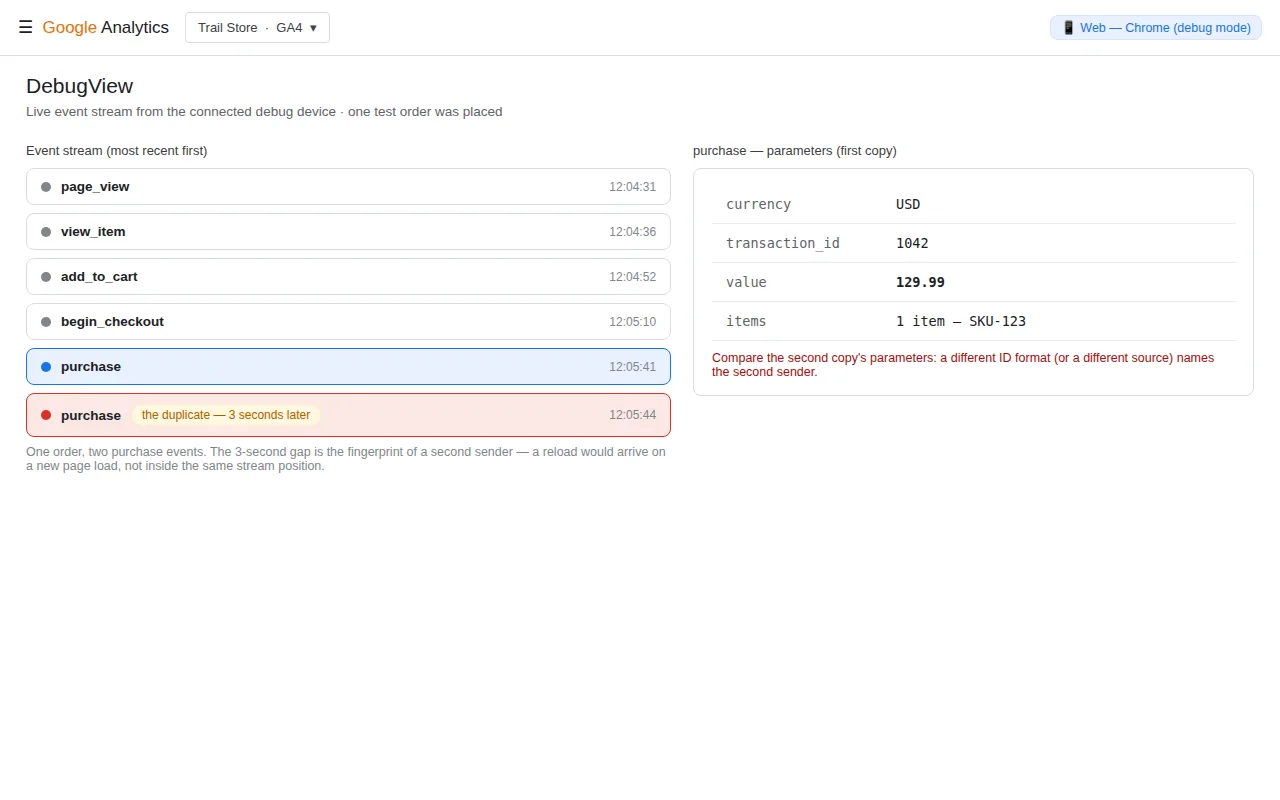
Check 2 — One test order, watched live (3 minutes). Open GTM Preview and GA4 DebugView side by side, place one real test order, and count. Exactly how many purchase events arrive for that one order — and if two, how many seconds apart, and (in Preview) which tags fired? Two tags firing names a container problem (cause 5 or 6). One tag firing but two DebugView events names a second sender outside GTM (cause 1 or 2). One event now, a second after you refresh the confirmation page, names cause 3.
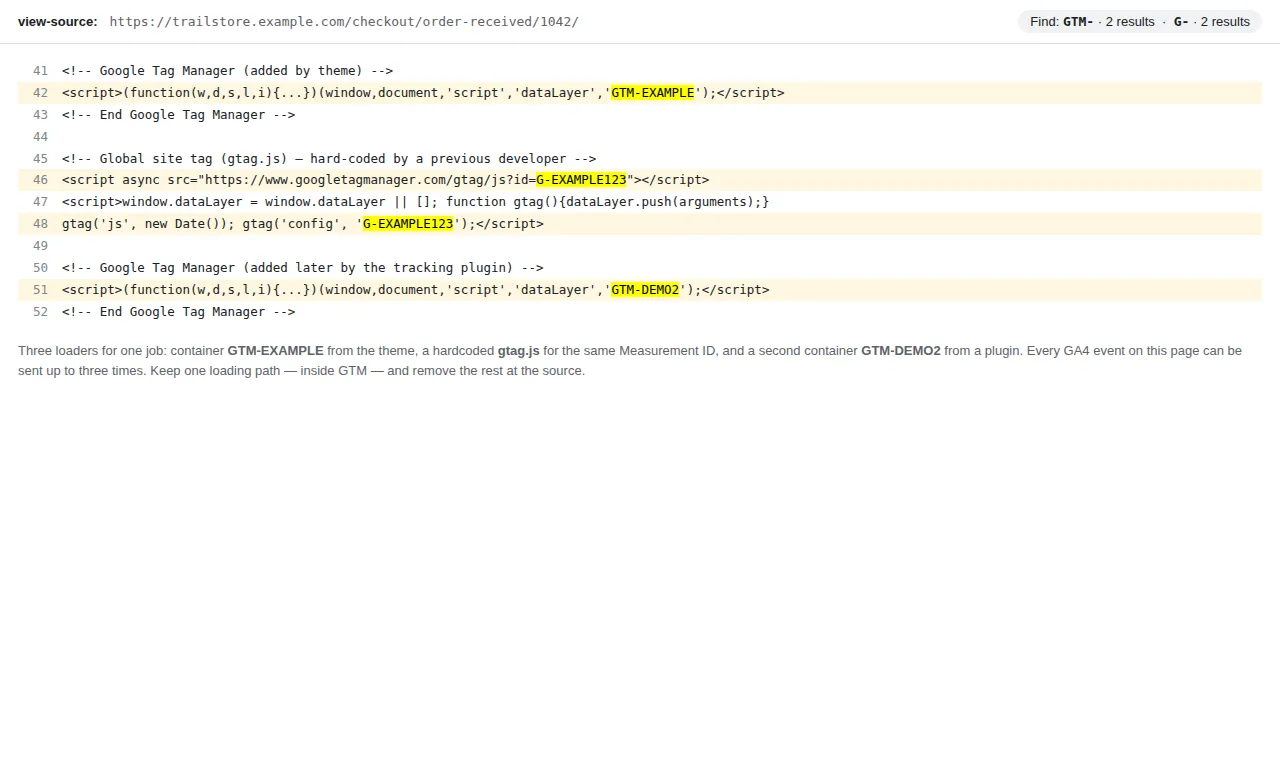
Check 3 — The page source (30 seconds). View the source of your thank-you page and search for GTM- and G-. Two different container IDs, one container plus a hardcoded gtag.js snippet, or your Measurement ID appearing outside GTM’s own code — each is a second sender with its name on it.
What GA4 already deduplicates — and the three conditions
GA4 is not defenceless here. Google’s rule: GA4 deduplicates purchase events that carry the same transaction_id. A shopper who reloads the confirmation page and re-sends the identical purchase does not inflate your reports — provided all three of these hold:
- The ID is present and identical. Same value, same format, byte for byte.
1042,WC-1042and a checkout-session ID are three different purchases to GA4. - The ID is unique per order and never empty. This is the trap that reverses the problem: if your push sends
transaction_id: ""(an empty string — a variable that resolved to nothing), GA4 deduplicates all such purchases into one. Duplication becomes catastrophic undercounting, and stores have “fixed” duplicates into losing 90% of their orders this way. - It is the same user, on a web data stream. The protection is documented for web streams, framed around one user’s repeats. Copies arriving from other devices, app streams, or offline/server uploads are not covered by the same promise — and the BigQuery export keeps the raw events regardless, so export-based revenue can double even when the GA4 interface looks clean.
In short: GA4’s deduplication is a safety net with exact stitching. Most duplicates slip through one of the three conditions — which is why the fixes below are about the senders, not about GA4 settings.
The 8 causes and fixes
1. Two senders: a platform integration and GTM both send the purchase
The classic. WooCommerce has GTM4WP (or another plugin) pushing purchase and the Google/GA4 integration from a second plugin or the platform’s own connection sending it too; Shopify has the Google & YouTube app plus a GTM purchase tag; BigCommerce has its native GA4 connection plus GTM. Each sender works perfectly alone; together every order lands twice — often with different ID formats, which is why GA4’s net misses it (check 1, row 2).
Fix: choose one sender for GA4’s purchase and disable the other at its source — not by blocking it in GTM, but in the plugin/app/platform setting that creates it. Then standardise on the surviving sender’s ID format. Our platform hubs build exactly one sender per store: WooCommerce + GA4, BigCommerce + GA4.
2. Two base installations: a hardcoded Google tag next to GTM (or two containers)
If everything is doubled — pageviews, sessions skewed, every event in DebugView arriving in identical twin pairs — the purchase is just one symptom. Somewhere, a previous developer hardcoded gtag.js in the theme while GTM also loads the Google tag, or two GTM containers both carry GA4 tags.
Fix: check 3 finds it. Keep exactly one Google tag loading path (inside GTM, in practice) and one container per page, and remove the other at the theme/template level — deleting it inside GTM changes nothing if the snippet lives in the header file.
3. The confirmation page re-fires: refresh, back button, order-email revisit
The thank-you page is a normal web page. Shoppers refresh it, return to it from the order email days later, or land on it again from browser history — and if the purchase push lives in that page’s code, it pushes again on every visit. With the same transaction_id, GA4’s net catches the repeat in its own reports. But three things still go wrong: your Google Ads and Meta tags on the same GTM trigger fire again (their deduplication is separate — the WooCommerce + Google Ads hub covers the Ads side), the BigQuery export counts both, and if any copy of the push lacks the ID, GA4 counts it too.
Fix: a fire-once guard in GTM (full build below) so the tags themselves refuse a second send for the same order — this protects every platform at once, not just GA4.
4. The transaction_id is missing, empty, or regenerated per push
No ID: every repeat is a new purchase, forever — the (not set) row in check 1. Empty string: the reverse disaster from condition 2 above. And the subtle third variant: the push builds the “ID” from a timestamp or random value, so the same order gets a new ID on every page load — deduplication has nothing stable to match.
Fix: the ID must be the store’s real order identifier, read from the order data at push time — the same value on every load of that confirmation page, and no other value for that order anywhere. If a variable occasionally resolves empty on your platform, the push must not fire at all until it resolves; an absent purchase you can debug beats a mislabelled one you cannot.
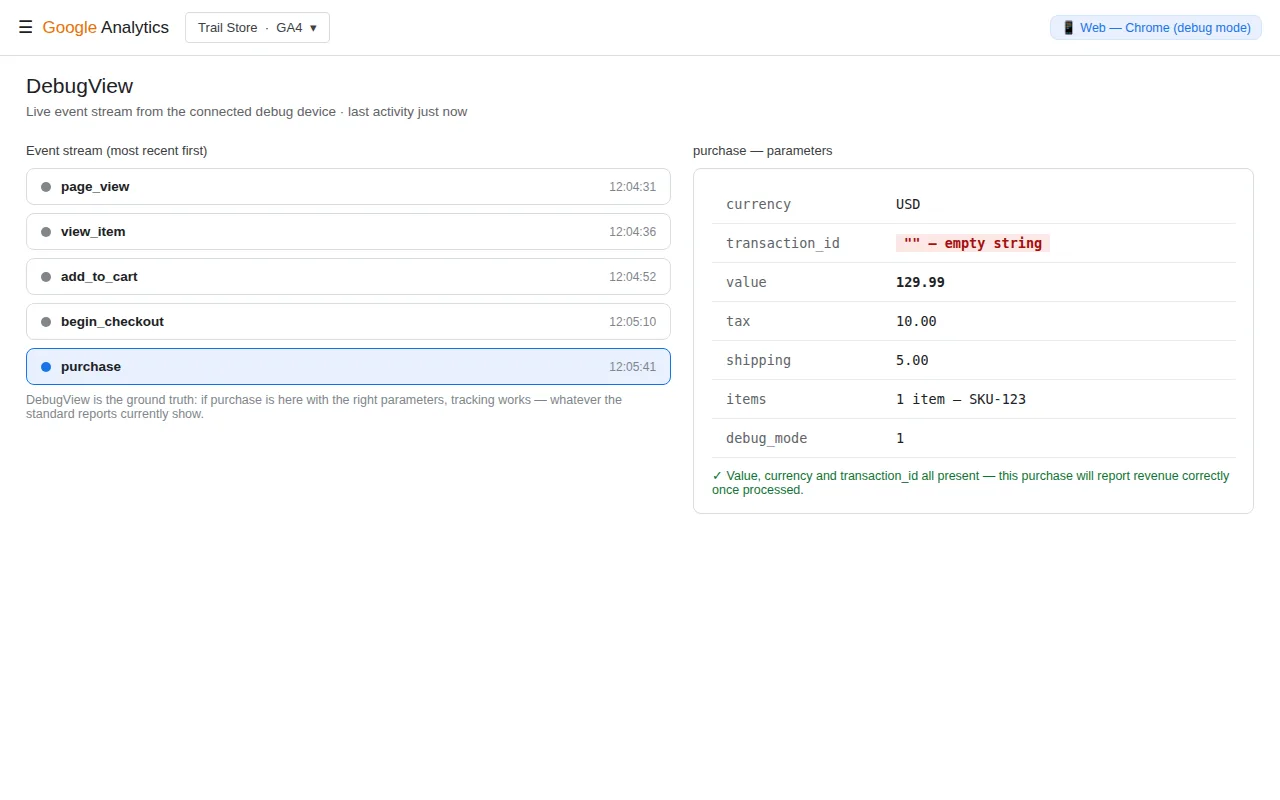
5. Two triggers on one tag: Page View and Custom Event
A GA4 event tag (or an {{Event}}-style funnel tag) ends up with two triggers attached — the Custom Event trigger on purchase and a Page View trigger for the thank-you page added “to be safe” during an earlier debugging session. One order, one push, two firings, milliseconds apart.
Fix: one purchase path per tag: the Custom Event trigger only. In Preview (check 2) this cause shows its hand immediately — the same tag listed twice under Tags Fired for a single event.
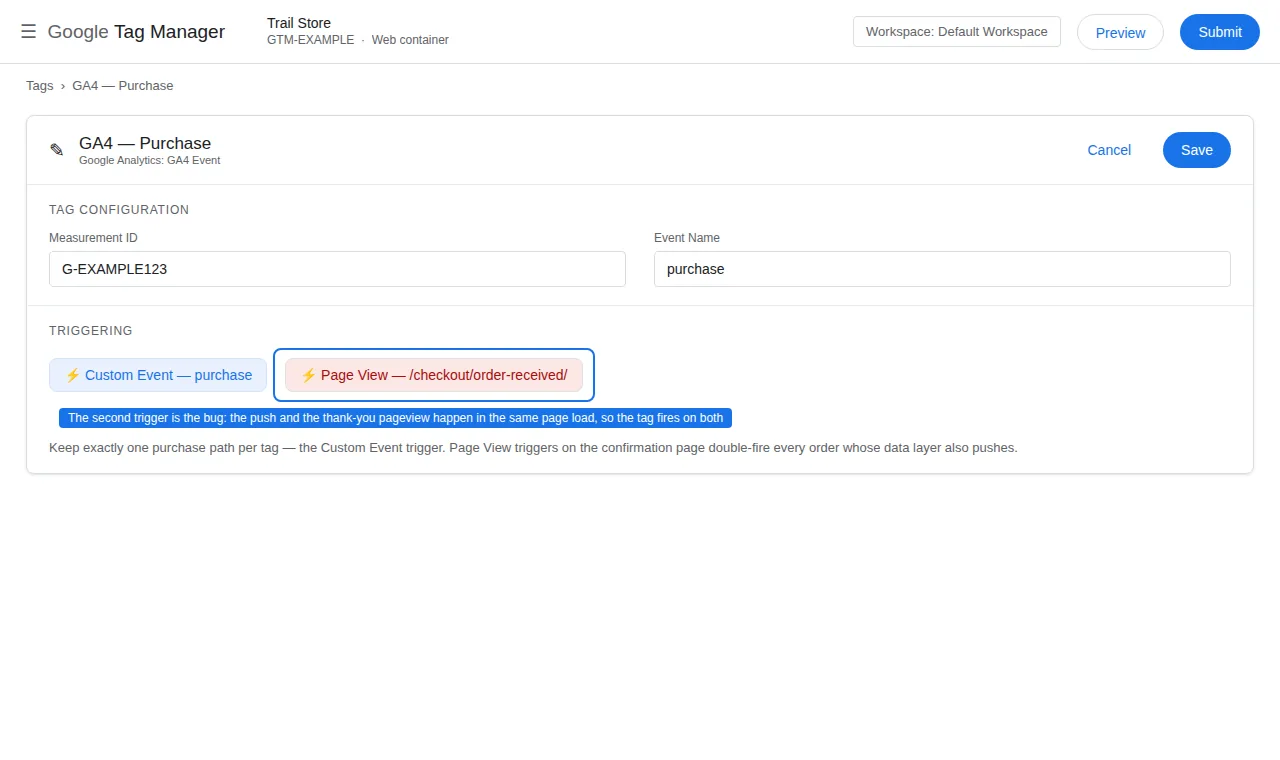
6. The tag itself exists twice in the container
Container imports (Merge instead of Overwrite), a duplicated workspace, or an old “GA4 Purchase — backup” tag nobody paused: two GA4 event tags, same Measurement ID, same trigger. Preview shows both firing; each looks legitimate alone.
Fix: search the container for every tag that can send purchase to that Measurement ID — including tags whose event name comes from {{Event}} — keep one, pause the rest for a week, then delete. While you are there, check GA4’s own Admin → Events → Create/Modify event rules: a rule that re-creates purchase from another event duplicates just as efficiently inside GA4 itself.
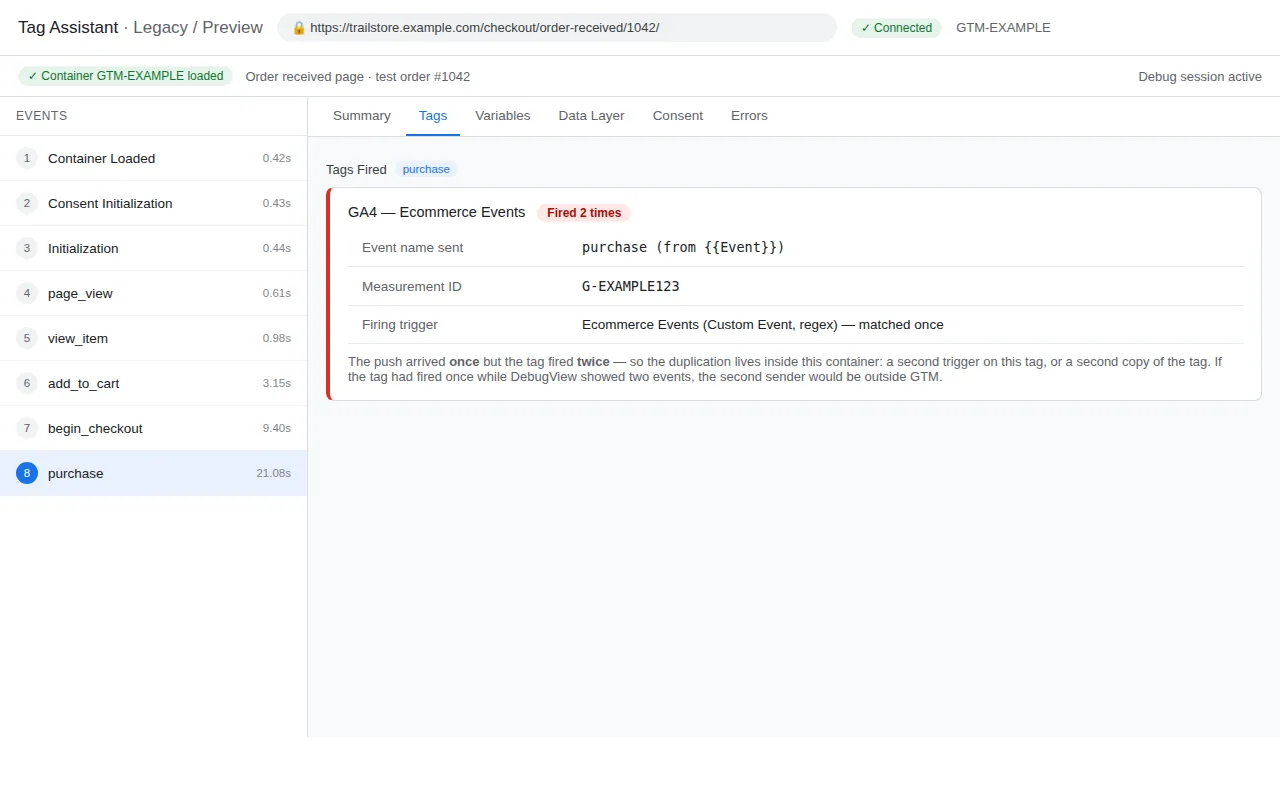
7. A server copy arrives with no shared key
Server-side GTM, a Measurement Protocol sender, or an offline upload sends the purchase a second time “for reliability” — but with a differently formatted ID, a different client/session identity, or hours later from a batch job. GA4’s same-user, same-ID conditions fail, and both copies count.
Fix: the server copy must reuse the browser event’s exact transaction_id and identity, or — for GA4 specifically — not be sent at all if the browser copy is reliable. (Meta is stricter and better documented here: browser + server copies merge only on a shared event_id, which is the same lesson in a different syntax — see the WooCommerce + Meta hub.)
8. The duplicate is not in GA4 — it is in Google Ads
Worth ruling out before you rebuild anything: GA4 is clean (check 1 shows every order once), but conversions look doubled. The usual shape: the GA4 purchase was imported into Google Ads as a conversion action and a native Google Ads purchase tag also fires — both set to Primary, both counting. That is an Ads-account configuration duplicate, not a tracking duplicate.
Fix: one Primary purchase source per Ads account; the other becomes Secondary. Diagnosis and the counting settings live in the WooCommerce + Google Ads hub.
The fire-once guard (fixes cause 3 for every platform at once)
GA4’s deduplication protects GA4’s reports. This guard protects the tags: once any tag has sent order 1042 from this browser, no purchase tag fires for it again on a reload.
The check variable — Variables → New → Custom JavaScript, name it JS - Purchase Already Sent:
function() {
  var id = {{DLV - ecommerce.transaction_id}};
  if (!id) return false;
  try {
    return sessionStorage.getItem('purchase_sent_' + id) === '1';
  } catch (e) {
    return false;
  }
}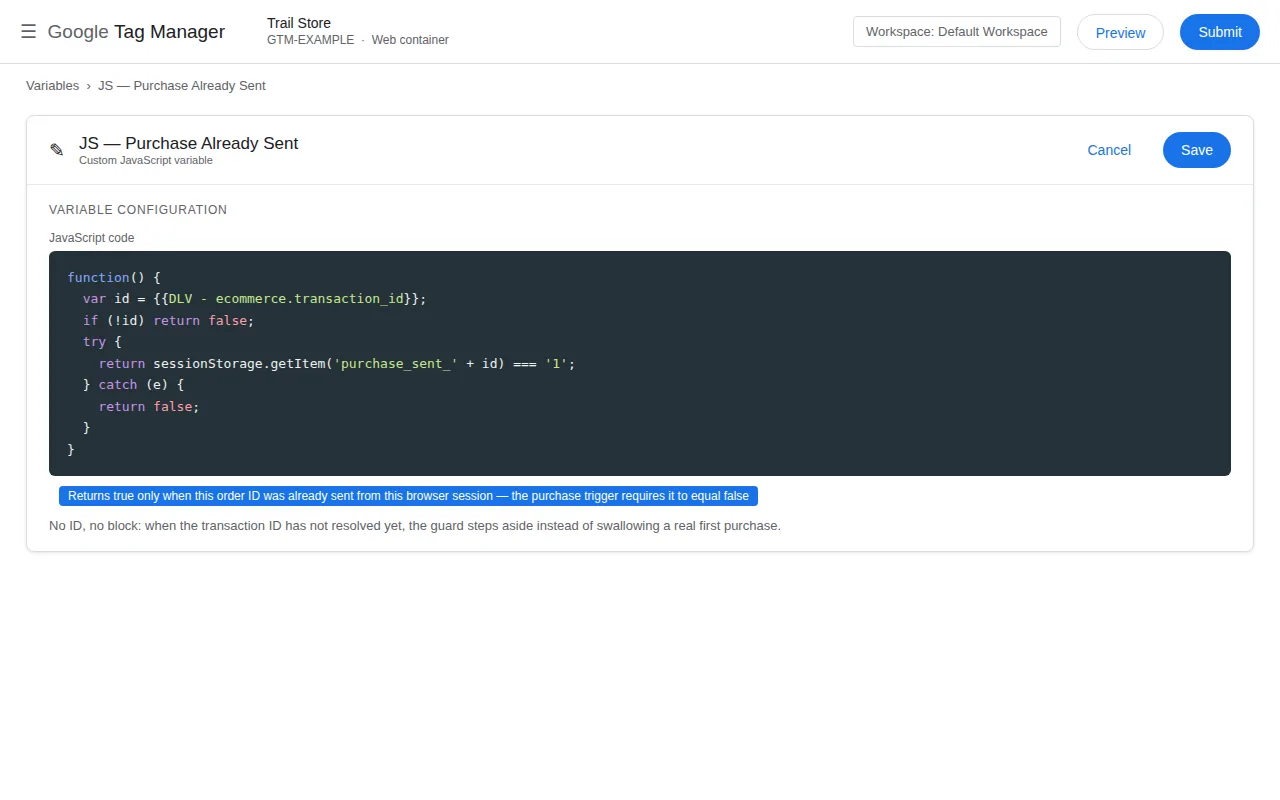
The condition — add to your purchase trigger: JS - Purchase Already Sent equals false. No ID yet means the guard never blocks a real first purchase; an ID already sent blocks the reload.
The marker — a Custom HTML tag that records the order, attached to each purchase tag as a cleanup tag (tag editor → Advanced Settings → Tag Sequencing → “Fire a cleanup tag”), so it runs only after a successful send:
<script>
  (function() {
    var id = {{DLV - ecommerce.transaction_id}};
    if (id) {
      try { sessionStorage.setItem('purchase_sent_' + id, '1'); } catch (e) {}
    }
  })();
</script>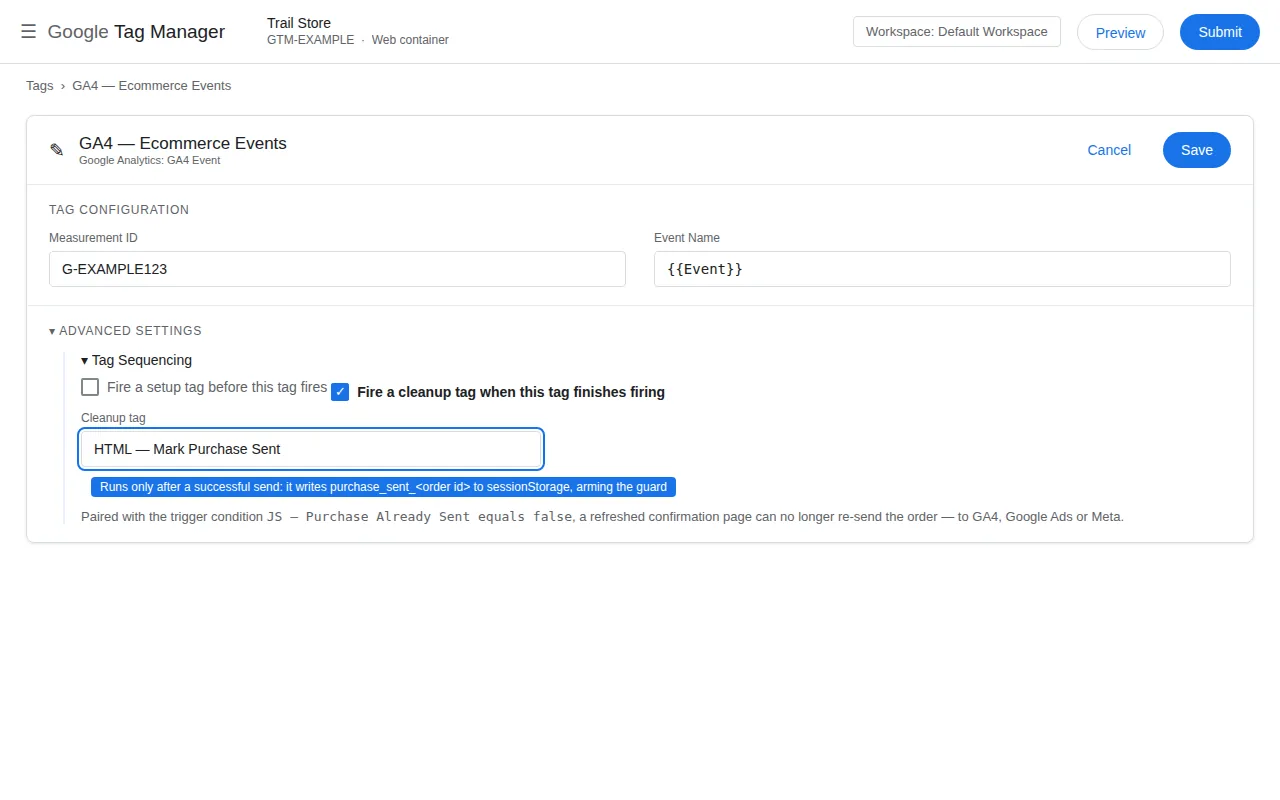
sessionStorage scopes the guard to the tab session — a returning customer next week is unaffected, and a genuinely new order always carries a new ID. Test it the honest way: place an order, watch one purchase arrive, refresh the confirmation page twice, and watch nothing new arrive in DebugView.
Prevention checklist
- One sender per platform, chosen deliberately, with every other integration disabled at its source.
- One container, one Google tag per page — verified in the page source, not from memory.
- The order ID is sacred: real, stable, identically formatted from every sender; never empty, never regenerated.
- One trigger, one tag per event — after any container import, re-count what fires on
purchasein Preview. - The fire-once guard on the purchase trigger, so reloads cannot re-send to any platform.
- A monthly 2-minute audit: the Explore transaction-ID table from check 1. Duplication creeps back through plugin updates and new apps; the table notices before your ROAS does.
If instead your purchase is not arriving at all, work the other direction through the missing-purchase fixes — and if tags fire in Preview but never reach GA4, start with the Preview-vs-GA4 checks.
Frequently asked questions
Doesn’t GA4 automatically remove duplicate purchases?
Only under three conditions: the copies carry the same transaction_id, from the same user, on a web data stream. Different ID formats from two senders, a missing ID, or server copies with different identities all pass straight through — which is where nearly every real duplicate comes from.
Can an empty transaction_id really delete my purchases?
Yes — it is the most dangerous version of this bug. GA4 deduplicates all purchases whose transaction_id is an empty string into a single purchase, so a broken variable that resolves to “” turns overcounting into losing almost every order. Never let a purchase fire with an empty ID.
My GA4 is fine but Google Ads conversions are doubled. Same problem?
Different layer, similar shape: usually a GA4 purchase import and a native Google Ads tag both set to Primary in the same account. GA4 deduplication cannot help because the duplication happens between two Ads conversion actions. Keep one Primary; make the other Secondary.
Will the GTM fire-once guard block real repeat orders?
No. The guard is keyed to the order ID: a new order has a new ID and fires normally. It only blocks the same order being sent again from the same browser session — refreshes and confirmation-page revisits.
Why does BigQuery show more purchases than the GA4 reports?
The export holds the raw events as they arrived; GA4’s interface applies the transaction-ID deduplication on top. A gap between the two is itself a diagnostic: it tells you repeats are being sent and GA4 is quietly absorbing some of them — fix the sender anyway.
Meta shows duplicates too. Does the same fix apply?
The senders discipline is identical (one Pixel, one server route), but Meta’s merge key is the shared event_id between the browser and server copies, not the transaction ID — and the fire-once guard above stops the browser side re-firing in the first place. The full Meta deduplication build is in the WooCommerce + Meta hub linked in cause 7.